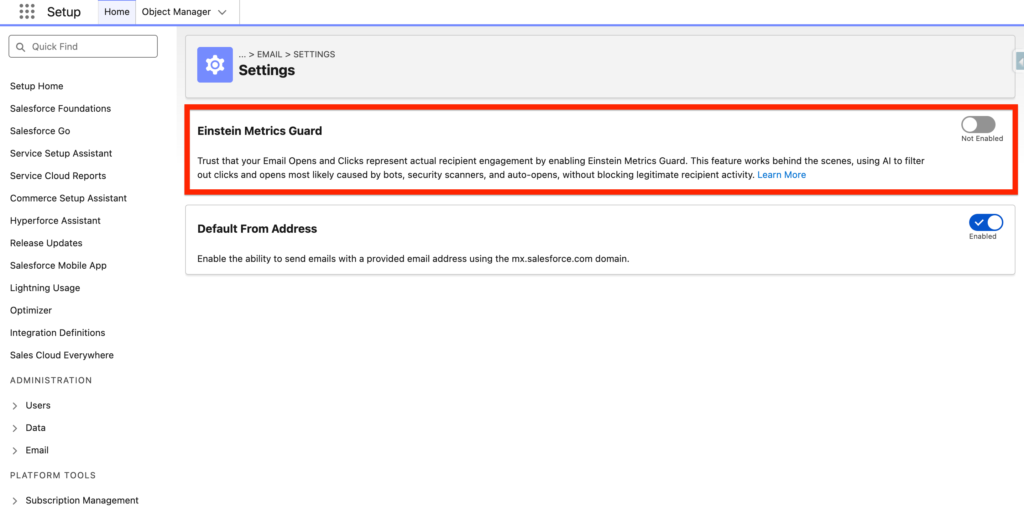
Einstein Metrics Guard is a feature that allows you to understand if your email sent from Marketing Cloud Next has been opened by a human or a bot. The original definition from Salesforce is: Trust that your Email Opens and Clicks represent actual recipient engagement by enabling Einstein Metrics Guard. This feature works behind the scenes, using AI to filter out clicks and opens most likely caused by bots, security scanners, and auto-opens, without blocking legitimate recipient activity.
Why does Einstein Metrics Guard exists? #
Einstein Metrics Guard exists because in today’s world many actions are happening in the background of your email inbox. For example, with the Mail Privacy Protection (MPP) or also called auto-opens ****when you receive an email within your Apple email inbox on your iPhone – Apple will automatically open (pre-fetching) the email in order to analyse it and understand the content of it to ensure that there is no malware in it.
So imagine, as a Marketer if you were sending an email campaign and all the Apple users were counted as ‘Email Opened’ even thought they never opened your email. Your insights/analytics would be wrong – and you couldn’t measure the performance of your email campaigns accurately and hence it would be impossible for you to improve your email strategy.
What are bots in email marketing? #
Bots in email marketing refers to programs that are performing automated actions such as opening, clicking links, unsubscribing, marking as spams. Bots can have the following impact on your email marketing campaigns:
- Wrong Engagement Metrics
- Increased unsubscribe rates
- Unintentional unsubscribe behavior
- Erroneous A/B test results
- Bot-triggered automated messaging journeys
- Inaccurate feedback (for example, if there’s a question in the email with multiple choices, the same user might appear to vote for all of the choices, leading to inaccurate analysis)
- Unreliable opt-in confirmations
What are security scanners in email marketing? #
Email scanners are email security solutions that have the ability to inspect emails, and can identify phishing, malware, and other common email threats. An email scanner is a solution that will analyse the content of the email before it reach the recipient inbox and decide wether or not the email contains phishing, malwares, malicious links, Data Leakage.
How does Einstein Metrics Guard works? #
Einstein Metrics Guard relies on a scoring system (confidence score) from 0 to 100 to define the accuracy of an email opened/clicked by a human (0 = bot – 100 = human). Einstein Metrics Guard is an AI model capable to analyse if platforms such as Apple Mail, Gmail and Outlook used by individuals for free are using email scanners, auto-opens and bots.
Einstein Metrics Guard is built on 2 models Time-series analysis and predictive model:
What is a Time-series analysis model? #
In AI, a time-series analysis model is a system that learns temporal patterns from sequential data to predict, classify, or detect changes over time.
What is a Predictive model? #
A predictive model uses historical data and algorithms to estimate future outcomes or probabilities.
Inputs used to populate insights from Einstein Metrics Guard: #
The engagement history includes these values.
- Email sends, bounces, and engagement events including opens, clicks, unsubscribes, spam complaints, and associated timestamps
- Data and metadata about customer sending patterns, including how campaigns are executed
Training Data #
The Einstein Metrics Guard model has been trained on data owned by Salesforce. My understanding is that Salesforce is collecting and analysing your Email Marketing Data (if you were a Marketing Cloud Account Engagement, or Marketing Cloud Engagement Customer) in order to feed the model that is powering Einstein Metrics Guard. Of course, data must haven been anonymised and sensitive information such as Email Address or First/Last Name are masked.
How to set-up Einstein Metrics Guard? #
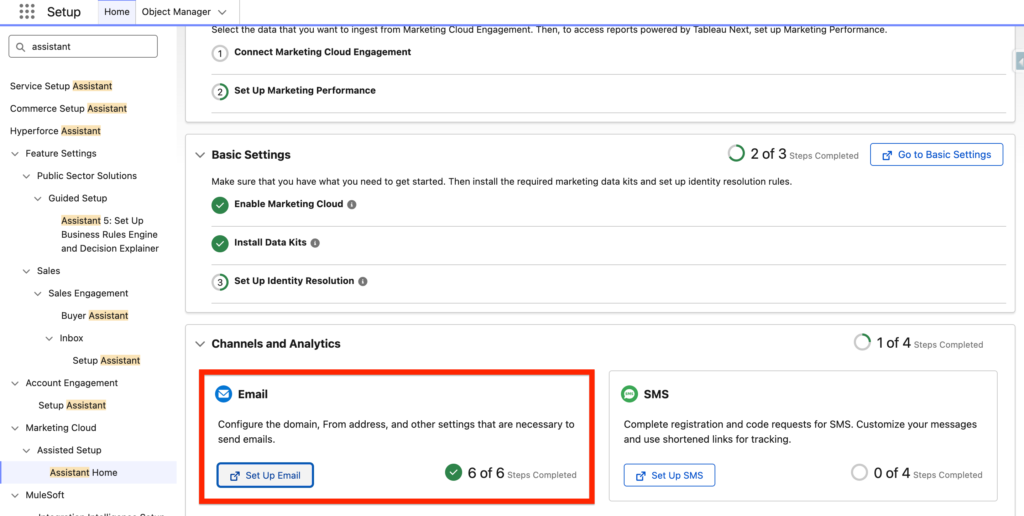
Setting-up Einstein Metrics Guard is very straightforward, all you need to do is navigate in Salesforce Set-up > and Assistant Home. From there Click on the Set up Email within the Email section.
Scroll down and click ‘Go to Email Feature Settings’ within the Activate Einstein Metrics Guard section.
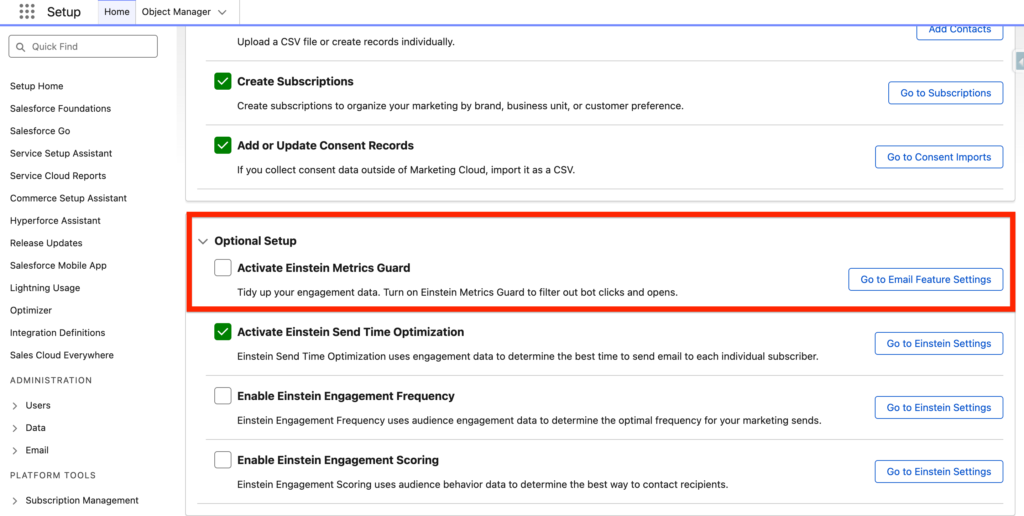
Then turn on the Toggle ‘Einstein Metrics Guard’.
Ressources: #
https://help.salesforce.com/s/articleView?id=mktg.um_channel_email_einstein_metrics_guard.htm&type=5
https://help.salesforce.com/s/articleView?id=mktg.mktg_einstein_model_card_emg.htm&type=5
https://blogs.oracle.com/marketingcloud/use-apples-auto-opens-safely-email-marketing