Every Marketing Cloud Next migration starts with the same question. What do we actually move into Data 360, and where does it land in the Customer 360 model?
The honest answer used to be “give me six weeks”. I built a Claude Skill so the answer is now “give me an afternoon”. This post explains why I built it, how to wire Claude to both Salesforce tenants, and how to run it end to end.
All figures below are from a fictional retailer I will call Harbourline. Round numbers, invented names, same shape as a real estate.
⚠️ Here’s the link to download the Claude Skill: https://drive.google.com/drive/folders/16TnVZWmH7rjgU9Mv2CYEXG0dVwoJE1NQ?usp=drive_link ⚠️
1. Why this skill exists #
A mature Marketing Cloud Engagement tenant carries hundreds of data extensions. Harbourline had 640. Maybe a quarter of them matter for the migration. The rest are dated campaign lists, test tables, archive copies, IP warming audiences and system tracking objects.
On the other side, Data 360 already holds 120 data model objects: the standard ssot__ model, CRM objects from the connector, source-system DLOs, unified profiles, data graph fragments. Some of those are copies of what SFMC holds. Some are the real system of record.
The migration work is the bridge between them. Which DEs are worth streaming. Which standard DMO each one fits. Where a custom DMO is justified. Which fields carry the join keys and whether those keys agree.
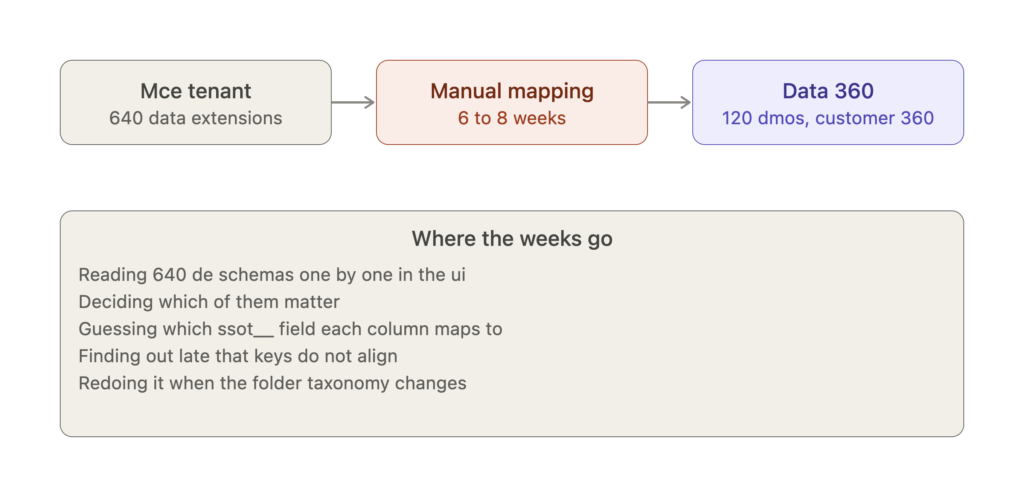
Done by hand this is six to eight weeks of reading schemas, guessing at ssot__ field names, and discovering late that the keys do not line up.
The skill compresses that into three prompts. The benefits are concrete.
Completeness. It reads every DMO and every DE with every field, type, primary key and folder path. Nothing is inferred from a sample.
Consistent decisions. Tiering and field mapping are rules in a JSON file, not judgement calls that drift between architects. The rules are visible, so a client can argue with a rule instead of a spreadsheet cell.
Findings, not just counts. Each stage surfaces the things that change a design: objects without a primary key, booleans stored as text, a live demo identity ruleset, environment twins like _UAT2, a secondary key that exists as a CRM id on one side and a source-system id on the other.
Reusable. The vocabulary specific to one industry lives in a handful of regex entries. Swap them and the same skill works for a retailer, an insurer or a university.
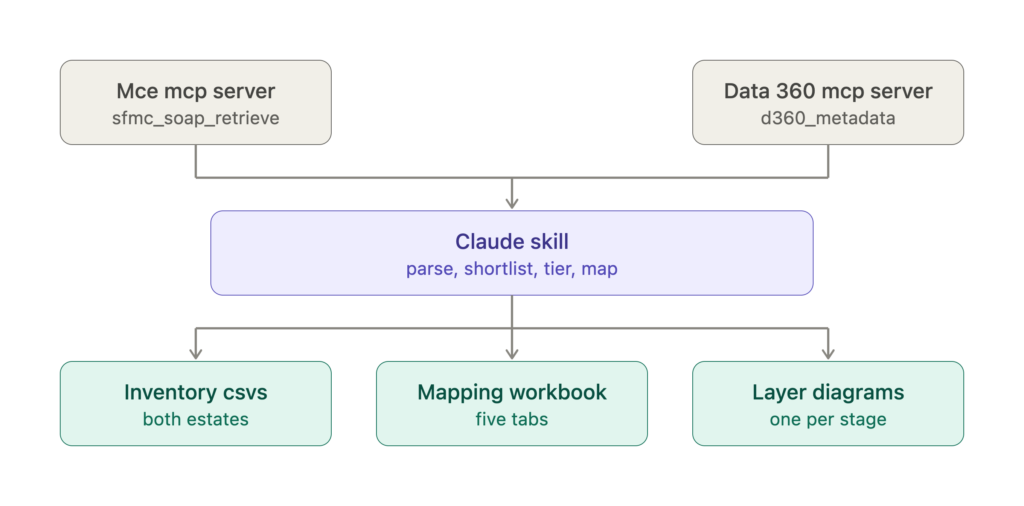
Two MCP servers feed one skill. The skill produces inventory CSVs for both estates, a five-tab mapping workbook, and a layer diagram per stage.
2. Setting up the Marketing Cloud Engagement MCP server #
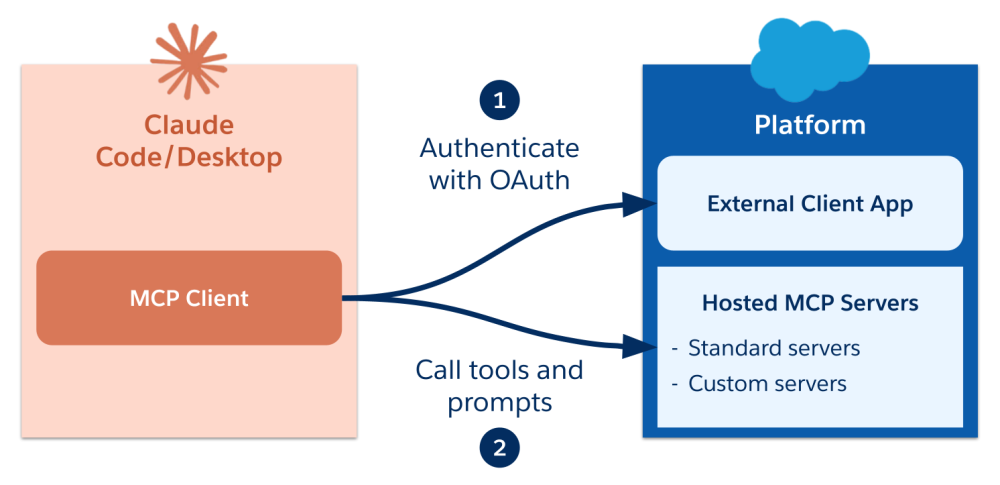
⚠️ I wrote the step by step process for Marketing Cloud Engagement MCP Server in this article: https://arthurbackouche.com/docs/marketing-cloud-next/migration/migrate-ampscript-emails-to-marketing-cloud-next-with-a-claude-skill/ ⚠️
Claude talks to MCE through an MCP connector that wraps the SOAP and REST APIs. Three steps.
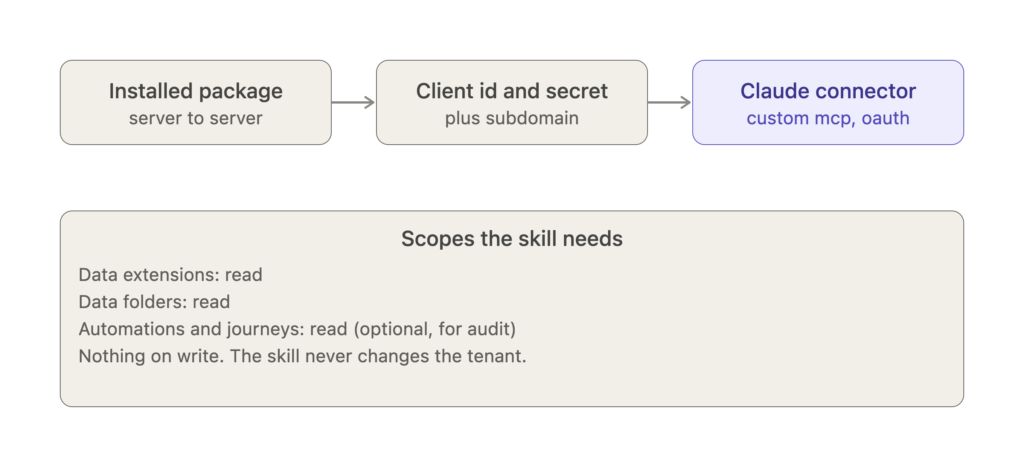
Create the installed package. In MCE Setup, Apps, Installed Packages, create a server-to-server package. Add an API Integration component. Grant read on Data Extensions, Data Folders, and optionally Automations and Journeys if you also want the audit features. No write scopes. The skill never changes the tenant.
Note the credentials. Client ID, client secret, and the tenant subdomain from the authentication base URI. Store them in your secrets manager, not in the chat.
Add the connector in Claude. Settings, Connectors, Add custom connector. Point it at the MCE MCP endpoint for your tenant and authenticate with the package credentials. When it completes, the sfmc_soap_retrieve, sfmc_rest_get and sfmc_describe_object tools appear.
One trap worth knowing. If you authenticate twice you can end up with a second connector whose URL ends in /oauth/callback. That one has no tools. Delete it and keep the one whose tools resolve.
Test with a single call before running the skill:
sfmc_soap_retrieve(object_type="DataExtension", properties=["Name","CustomerKey"])
If the result says OverallStatus: OK and lands in a file rather than inline, you are ready.
3. Setting up the Data 360 MCP server #
⚠️ This article explain in details how to set-up the Data 360 MCP server for Data 360: https://developer.salesforce.com/blogs/2026/05/connect-claude-with-salesforce-hosted-mcp-servers ⚠️
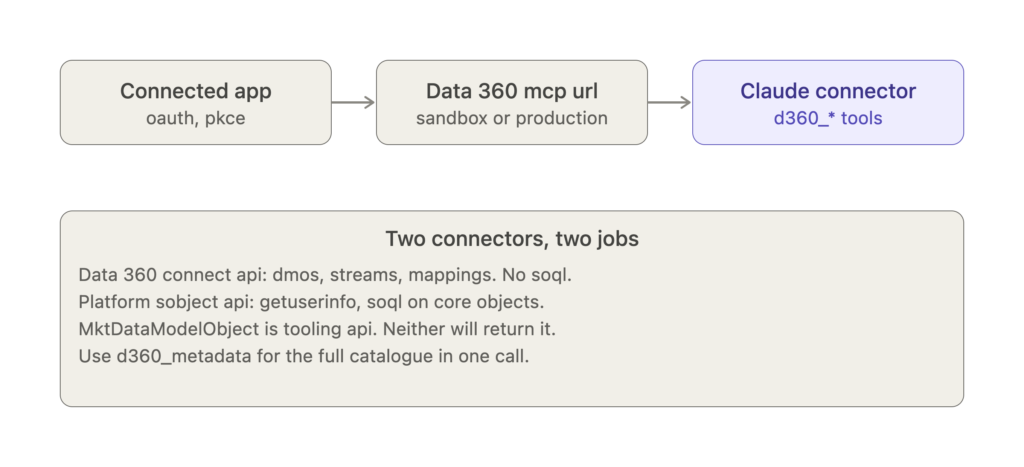
Salesforce exposes Data 360 through the Connect API MCP server. It authenticates via a connected app.
Create the connected app. In Salesforce Setup, App Manager, new connected app with OAuth enabled and PKCE. Scopes: cdp_api, cdp_query_api, cdp_profile_api, api, refresh_token. Note the consumer key.
Pick the environment. The MCP URL differs for sandbox and production. For a migration plan, point at the sandbox where the target model lives.
Add the connector in Claude. Same flow as MCE. When it completes, three meta-tools appear: search, payload_examples, and execute. Every d360_* tool runs through execute.
Two things architects trip on here.
First, the Data 360 connector has no SOQL and no getUserInfo. Those live on the platform sObject connector for the same org. If you want to confirm which user and org you are connected as, add that connector too.
Second, MktDataModelObject is a Tooling API entity. Querying it through any sObject endpoint returns INVALID_TYPE. Do not spend time on it. The full DMO catalogue, with every field, type, category and primary key, comes back from one call:
execute(toolName="d360_metadata", paramsJson="{}")
Verify with that call. If the result is stored to a file, the connector is working.
4. Running the skill #
Install the skill from the .skill file. From then on, any prompt that mentions DMOs, data extensions, Data Cloud mapping or MC Next migration will trigger it.
⚠️ Here’s the link to download the Claude Skill: https://drive.google.com/drive/folders/16TnVZWmH7rjgU9Mv2CYEXG0dVwoJE1NQ?usp=drive_link ⚠️
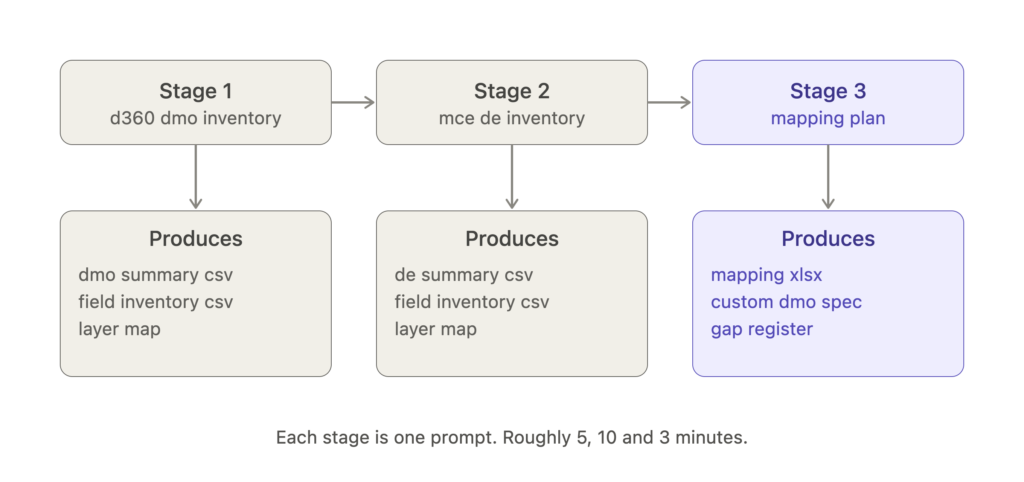
Stage 1: Data 360 inventory #
Prompt: “Pull all the DMOs from Data 360 and give me an understanding of every field.”
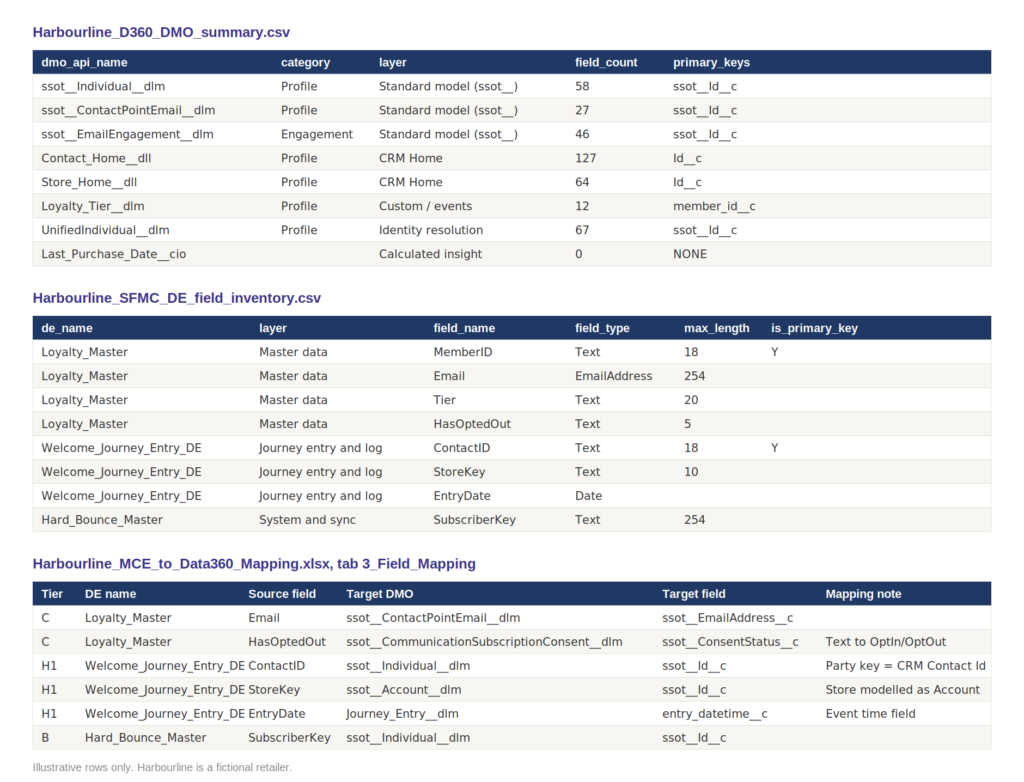
The skill calls d360_metadata, parses the stored result, and writes two CSVs: a DMO summary and a field inventory. It then prints a layer map and leads with findings. On Harbourline that was two calculated insights with zero fields, four curated objects duplicated with a _UAT2 suffix, a demo identity ruleset still materialised alongside the production one, and is_deleted typed as text on every profile object.
Stage 2: MCE inventory #
Prompt: “Now do the same for Marketing Cloud Engagement. Only the useful and main data extensions.”
Three SOAP retrieves. All DEs. The folder tree. Then fields, but only for the shortlist. The shortlist rules keep master, system, journey, transactional and reporting folders plus a whitelist of platform tables at the root. They drop dated campaign folders, test, archive, IP warming, delete-tracking and triggered-send noise.
The skill prints the per-folder counts before it fetches fields so you can adjust the cut. Harbourline went from 640 to 180.
A detail that matters for context size: fields are retrieved in batches of about 40 customer keys. Below 30 the result comes back inline as raw SOAP XML and floods the conversation. Above 40 it lands in a file. The skill knows this.
Stage 3: Mapping plan #
Prompt: “Our objective is to ingest MCE data into Data 360 using the Customer 360 model. Standard DMOs where possible, custom where needed. Find the best mapping.”
This is where the rules do their work.
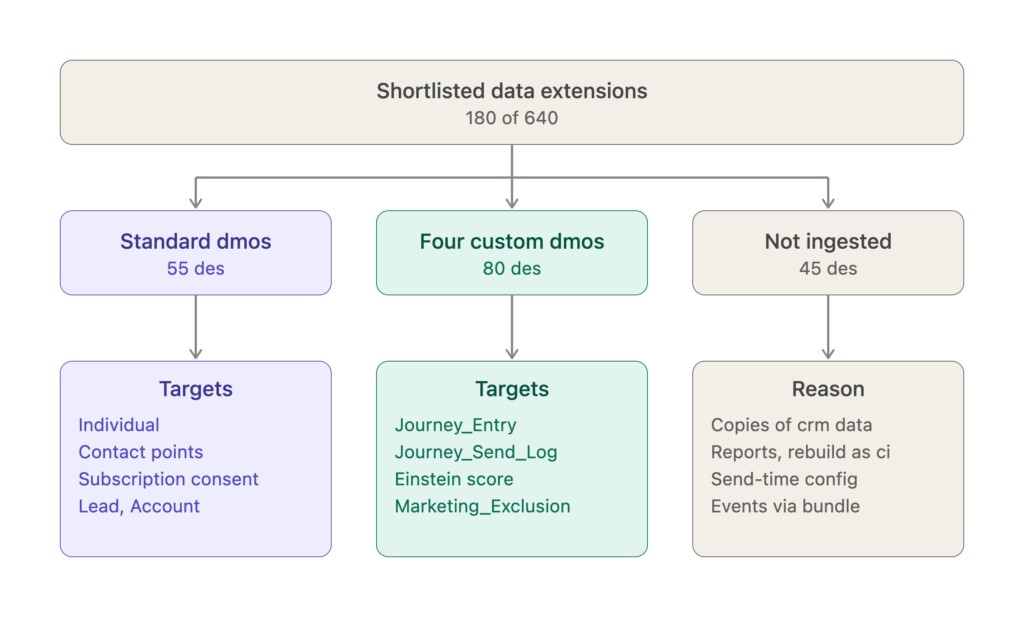
The strategy behind the tiers:
System of record first. SFMC copies of CRM or source-system master data are reconcile-only. Re-ingesting them makes identity resolution reconcile SFMC against itself.
Ingest what SFMC owns. Consent and subscription state, bounces, journey entry and send history, Einstein scores, marketing-acquired leads, Personalization behaviour.
Standard DMO by default. Individual, ContactPointEmail, ContactPointPhone, ContactPointAddress, Account, Lead, CommunicationSubscriptionConsent. Email and SMS tracking already flows via the MCE starter bundle, so the skill never adds data-extension streams for it.
Four custom DMOs, no more. Journey_Entry__dlm and Journey_Send_Log__dlm as Engagement, Einstein_Engagement_Score__dlm as Profile, Marketing_Exclusion__dlm as Other. Dozens of journey DEs collapse into the first two via one SFMC SQL union each. That also fixes the missing-primary-key problem and avoids one data stream per journey.
Reporting DEs are rebuilt as Calculated Insights, not ingested.
The skill validates every target field name against the Stage 1 inventory, because clients extend standard DMOs and a field in the documentation may not exist in the tenant.
The identity statement #
Every run ends with two sentences you need in the design document.
The SFMC party key (ContactID or SubscriberKey) is usually the CRM Contact Id. If so, it maps to the same ssot__Individual__dlm.ssot__Id__c the CRM connector populates and no new match rule is needed.
Secondary entity keys almost never align. SFMC holds the CRM id for a product, policy or asset. Data 360 holds the source-system id. The skill names the crosswalk DMO that must exist before any attribute of that entity is mapped, and which journeys are blocked until it does.
5. What you get #
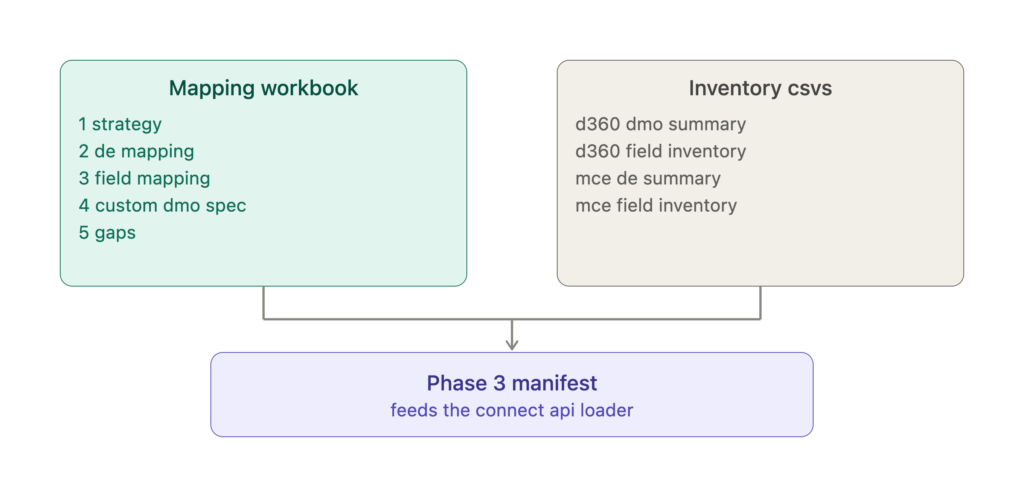
The workbook has five tabs. Strategy, with the principles and tier counts. DE mapping, one row per shortlisted DE with tier, target and rationale. Field mapping, one row per field with the ssot__ target or custom attribute. Custom DMO spec, with primary key, event time field and attributes. Gaps, with every missing key, mistyped flag and spelling variant.
Together with the four inventory CSVs it drops straight into a Phase 3 manifest for a Connect API loader. The next prompt after the plan is usually “generate the payloads for the four custom DMOs and the two union DEs”. That works too.
Closing #
The skill does not replace the architect. It removes the six weeks of reading that stood between the architect and the decisions. Every rule is visible and every finding cites the object it came from, so the review conversation with the client is about the model, not about the spreadsheet.