
And building a Claude Code agent that does the rewrite for you.
In this article I will explain how to migrate email templates from Marketing Cloud Engagement to Marketing Cloud Next. If you have been using Marketing Cloud Engagement for years, chances are you have hundreds of email templates containing AMPscript.
Both platforms support AMPscript. But migrating the templates will not be as simple as copying and pasting from one platform to the other. You need to approach the migration from a fresh perspective and focus on the outcome: dynamic email templates that are personalised based on your customer profile and behaviour.
This is a long one. Here is the map:
- Why copy/paste does not work
- The data layer, in detail
- The function gap, in detail
- The personalisation toolkit in Marketing Cloud Next
- Three worked examples
- The migration process
- Building the Claude Code agent
- Handling the templates the agent cannot convert
- Testing
1. Why copy/paste does not work #
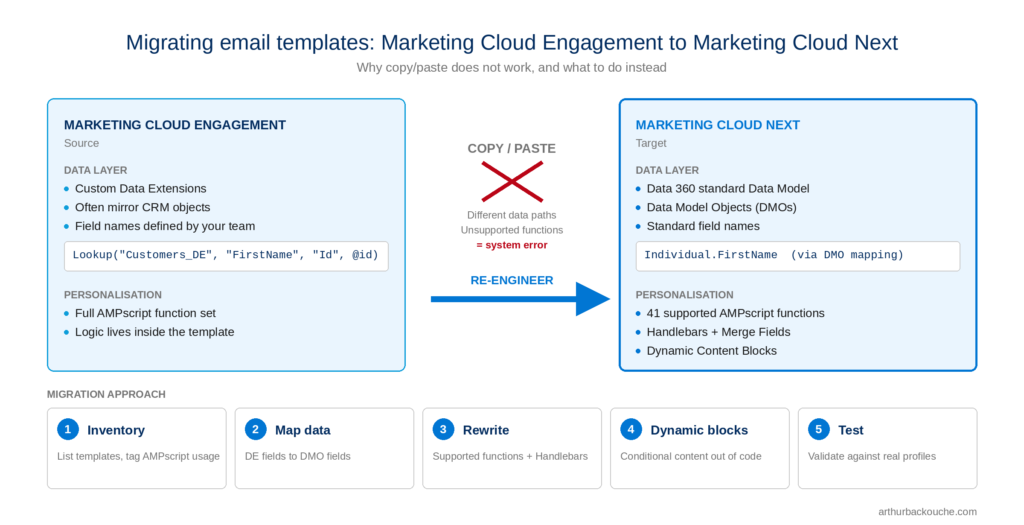
Two things make the process more complicated than a straight copy/paste.
The data layer is different. Marketing Cloud Engagement reads from custom Data Extensions. Marketing Cloud Next reads from Data 360 and its standard data model. Every Lookup() in your templates points to a table and a field that no longer exist in that shape.
The function set is different. Of the 150 AMPscript functions in Marketing Cloud Engagement, 41 are supported in Marketing Cloud Next as of the Summer ’26 release. The other 109 will throw a system error.
Everything below is about dealing with those two gaps at scale.
2. The data layer, in detail #
2.1 How Marketing Cloud Engagement stores data #
Marketing Cloud Engagement does not rely on a default data model. Almost everything lives in Data Extensions. Over the years, most orgs end up with:
- A sendable Data Extension per audience, keyed on
SubscriberKey. - Synchronised Data Extensions mirroring CRM objects (
Contact_Salesforce,Account_Salesforce,Opportunity_Salesforceand so on). - Custom Data Extensions built by SQL Query Activities, often denormalised for personalisation.
- Reference Data Extensions for products, stores, offers, translations.
Templates reach this data in two ways. Directly, through the sendable Data Extension’s fields (%%FirstName%%). Or through Lookup() and its rowset cousins (LookupRows(), LookupOrderedRows()), which query any Data Extension by key at send time.
The important point: the schema is yours. Field names, table names and relationships were designed by your team. The templates are tightly coupled to that schema.
2.2 How Marketing Cloud Next stores data #
Marketing Cloud Next is built on the Salesforce core platform and reads customer data from Data 360. Four concepts matter for personalisation:
Data Model Objects (DMOs). The Customer 360 Data Model is a standard set of interconnected objects. Individual, Contact Point Email, Unified Individual, Sales Order, Loyalty Program Member and so on. Your CRM and other sources are ingested and mapped into these objects.
Data Graphs. A Data Graph is a denormalised, pre-computed view of a DMO and its related objects, built for low-latency reads. When Marketing Cloud Next personalises an email, it reads from a Data Graph, not from the raw DMOs. The Data Graph defines which fields and related lists are reachable from a template.
Marketing Objects. Introduced in Summer ’26. These are the closest thing to a Data Extension in Marketing Cloud Next. A container you populate by CSV import, then query with Lookup(). At the time of writing, import is manual CSV only. Good for reference data (store lists, product catalogues, offer codes). Not a replacement for synchronised CRM data.
Salesforce CRM objects. RetrieveSalesforceObjects() is supported. You can read core records directly. Read only. No create, no update.
2.3 What this means for your templates #
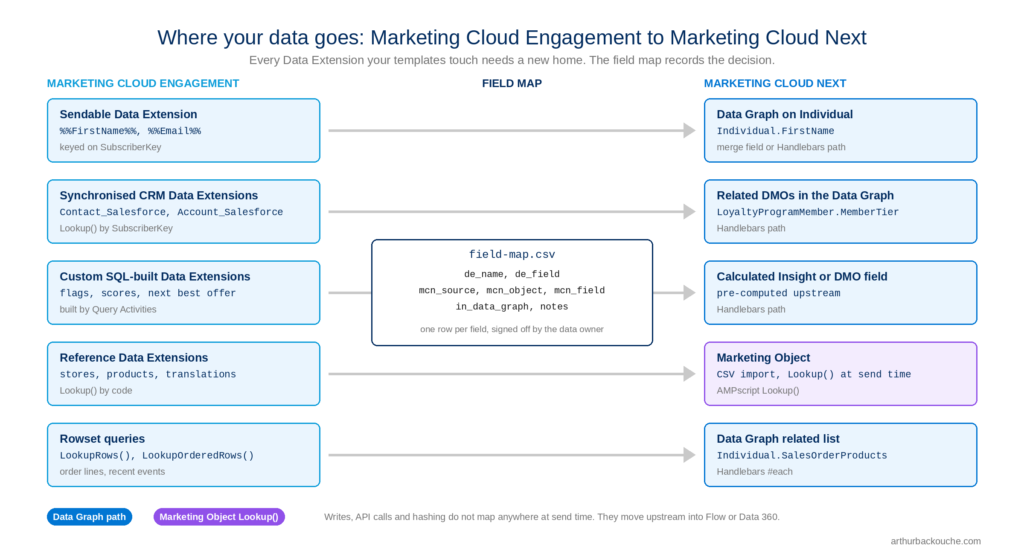
Every data reference in a template needs a new home. In practice the mapping falls into four buckets:
| What the template reads today | Where it goes in Marketing Cloud Next | How the template reaches it |
|---|---|---|
Sendable DE fields (%%FirstName%%) | Data Graph on Individual or Unified Individual | Merge field or Handlebars path |
Synchronised CRM DE via Lookup() | Same object, now a DMO in the Data Graph | Handlebars path on the related object |
| Custom SQL-built DE (flags, scores, next best offer) | Calculated Insight or a field on the DMO | Handlebars path, or Lookup() on a Marketing Object |
| Reference DE (stores, products, translations) | Marketing Object | Lookup() |
The field map is the single most important artefact of the migration. It is a spreadsheet with one row per Data Extension field your templates touch, and the object and field it maps to in Marketing Cloud Next. Build it once. Every template rewrite depends on it.
3. The function gap, in detail #
3.1 The numbers #
Salesforce publishes support per function. Every function page in the AMPscript reference now has two columns: Engagement and Next. As of Summer ’26:
- Supported in Next: 41
- Not supported in Next: 109
- Total: 150
Roughly 30% of the function set survives. That sounds bad. It is less bad than it sounds, because the 41 that survive are the ones that display values. The 109 that were cut mostly write data, call APIs or serve CloudPages. AMPscript in Marketing Cloud Next has been redesigned as a personalisation display tool, not a data manipulation tool.
3.2 What is supported #
| Category | Functions |
|---|---|
| Math (5) | Add, Subtract, Multiply, Divide, Mod |
| Date and time (6) | Now, DateAdd, DateDiff, DateParse, FormatDate, StringToDate |
| String (11) | Concat, Length, Trim, Lowercase, Uppercase, ProperCase, SubString, Replace, ReplaceList, IndexOf, Format |
| Utilities (10) | Empty, IsNull, Iif, Random, FormatNumber, FormatCurrency, Output, OutputLine, RaiseError, v |
| Data access (5) | Lookup, Field, Row, RowCount, BuildRowsetFromJson |
| Salesforce (1) | RetrieveSalesforceObjects |
| Content (3) | ContentBlockById, ContentBlockByKey, ContentBlockByName |
Control flow (IF, ELSEIF, ELSE, FOR) still works.
3.3 What is not supported, and what to do instead #
| Category cut | Count | What it was used for | What to do in Marketing Cloud Next |
|---|---|---|---|
| Data Extension write and rowset | 17 | InsertDE, UpdateDE, UpsertDE, LookupRows, LookupOrderedRows, ExecuteFilter | Reads: use the Data Graph related list with Handlebars #each. Writes: move to Flow or Data 360 ingestion. |
| CloudPages and web forms | 13 | CloudPagesURL, RequestParameter, Redirect | No CloudPages in Next. Use Experience Cloud, Marketing Cloud Next forms, or a landing page platform. |
| HTTP and external | 8 | HttpGet, HttpPost, UrlEncode, WrapLongURL | No outbound calls at send time. Pre-compute in Data 360 or a Flow and store the result on the record. |
| Salesforce write | 4 | CreateSalesforceObject, UpdateSingleSalesforceObject | Flow. Triggered by the send or by engagement events. |
| SOAP API | 9 | InvokeCreate, InvokeRetrieve and friends | Gone. Redesign. |
| Encryption and auth | 8 | MD5, SHA256, EncryptSymmetric, GetJwt | Pre-compute hashed or tokenised values in Data 360 and store them on the record. |
| SMS | 8 | Msg, Noun, Verb | Not covered by this article. |
| Dynamics CRM | 9 | All Mscrm* functions | Gone. |
| Content management | 16 | ContentArea, Image, TreatAsContent, BuildOptionList | Content blocks in the new content model. ContentBlockBy* covers most cases. |
| Social | 3 | GetPublishedSocialContent | Gone. |
| Contact | 1 | UpsertContact | Flow. |
| Date conversion | 4 | DatePart, GetSendTime, LocalDateToSystemDate | FormatDate and DateAdd cover most. Timezone is UTC. |
| String processing | 5 | RegExMatch, BuildRowsetFromString, Char | Replace, IndexOf, SubString, or the Handlebars string helpers. |
| Other utilities | 5 | AttributeValue, Domain, Guid, IsEmailAddress | Merge fields and Empty. Generate GUIDs upstream. |
3.4 The Handlebars layer underneath #
One more thing to understand. Marketing Cloud Next converts AMPscript to Handlebars before rendering. AMPscript is a compatibility layer, not the native engine. Two consequences:
- A function can be listed as supported and still fail if the equivalent Handlebars capability is not there yet. Test in the editor. Do not trust the list alone.
- Anything you can write in AMPscript, you can write in Handlebars directly. Often more cleanly. For new logic, write Handlebars. Keep AMPscript for migrated logic where the syntax is already proven.
4. The personalisation toolkit in Marketing Cloud Next #
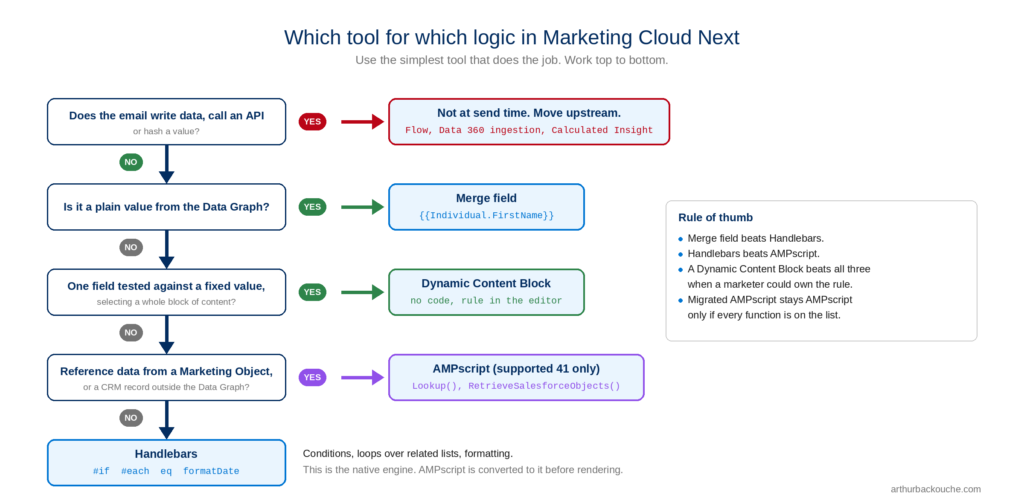
You now have four tools instead of one. Use the simplest one that does the job.
Merge fields. {{Individual.FirstName}}. Zero logic. Use for any value that comes straight from the Data Graph. The visual editor inserts these from a picker, so marketers can maintain them without you.
Handlebars. {{#if}}, {{#each}}, {{#unless}}, plus comparison, date, math, string and list helpers. This is the native engine (based on Handlebars.Net with Salesforce extensions). Use for conditions, loops over related lists, and formatting. The helper index is the reference.
AMPscript (the supported 41). Use when migrating existing logic that only uses supported functions, or when you need Lookup() against a Marketing Object or RetrieveSalesforceObjects().
Dynamic Content Blocks. Rules-based content variants configured in the editor, no code. Use when a condition selects a whole block of content (hero image by segment, offer by tier, language by locale). Every condition you move here is one less line of code to maintain and one less thing that can break at render time.
| Need | Reach for |
|---|---|
| Show a value | Merge field |
| Show a value with a fallback | Handlebars #if |
| Format a date, number or currency | Handlebars helper, or AMPscript FormatDate / FormatCurrency |
| Show or hide a section based on one field | Dynamic Content Block |
| Show or hide based on a calculation | Handlebars |
| Loop over order lines, recommendations, events | Handlebars #each over a Data Graph related list |
| Look up reference data (store, product, offer) | AMPscript Lookup() on a Marketing Object |
| Read a CRM record not in the Data Graph | AMPscript RetrieveSalesforceObjects() |
| Write data, call an API, hash a value | Not at send time. Flow or Data 360, upstream. |
5. Three worked examples #
Same welcome email, three levels of complexity.
Example A: simple field with fallback (green) #
Marketing Cloud Engagement:
%%[
SET @firstName = Lookup("Customer_Master", "FirstName", "SubscriberKey", _subscriberkey)
IF Empty(@firstName) THEN SET @firstName = "there" ENDIF
]%%
Hi %%=v(@firstName)=%%,
Marketing Cloud Next (Handlebars):
Hi {{#if Individual.FirstName}}{{Individual.FirstName}}{{else}}there{{/if}},
Marketing Cloud Next (AMPscript, also valid):
%%[
SET @firstName = Individual.FirstName
IF Empty(@firstName) THEN SET @firstName = "there" ENDIF
]%%
Hi %%=v(@firstName)=%%,
The Lookup() disappears because the value is already in the Data Graph. The fallback logic is unchanged.
Example B: conditional block on a related object (amber) #
Marketing Cloud Engagement:
%%[
SET @tier = Lookup("Loyalty_Members", "Tier", "SubscriberKey", _subscriberkey)
SET @points = Lookup("Loyalty_Members", "PointsBalance", "SubscriberKey", _subscriberkey)
IF @tier == "Gold" THEN
]%%
  <p>As a Gold member you have %%=FormatNumber(@points, "N0")=%% points.</p>
%%[ ELSE ]%%
  <p>Join Gold and start earning points.</p>
%%[ ENDIF ]%%
Marketing Cloud Next:
{{#if (eq LoyaltyProgramMember.MemberTier "Gold")}}
  <p>As a Gold member you have {{formatNumber LoyaltyProgramMember.PointsBalance "N0"}} points.</p>
{{else}}
  <p>Join Gold and start earning points.</p>
{{/if}}
Why amber: the agent can do the syntax swap, but only if Loyalty_Members.Tier is mapped to LoyaltyProgramMember.MemberTier in the field map, and only if that object is in the Data Graph. If either is missing, the agent flags it and a human decides.
Also a candidate for a Dynamic Content Block. Two variants, one rule on MemberTier. No code.
Example C: rowset loop (red) #
Marketing Cloud Engagement:
%%[
SET @rows = LookupOrderedRows("Order_Lines", 5, "OrderDate DESC", "SubscriberKey", _subscriberkey)
IF RowCount(@rows) > 0 THEN
  FOR @i = 1 TO RowCount(@rows) DO
    SET @row = Row(@rows, @i)
    SET @product = Field(@row, "ProductName")
    SET @price = Field(@row, "Price")
]%%
    <tr><td>%%=v(@product)=%%</td><td>%%=FormatCurrency(@price, "en-AU")=%%</td></tr>
%%[
  NEXT @i
ENDIF
]%%
LookupOrderedRows() is not supported. There is no direct equivalent. This is a redesign, not a rewrite:
- Confirm
Sales OrderandSales Order Productare in the Data Graph as a related list onIndividual. - Confirm the Data Graph sorts and limits the list the way you need (it may not, and the sort may need to happen at ingestion).
- Rewrite as a Handlebars loop:
{{#each Individual.SalesOrderProducts}}
  <tr><td>{{this.ProductName}}</td><td>{{formatCurrency this.Price "en-AU"}}</td></tr>
{{/each}}
The agent cannot make decisions 1 and 2. That is why it is red. It can still write step 3 once you confirm the path.
6. The migration process #
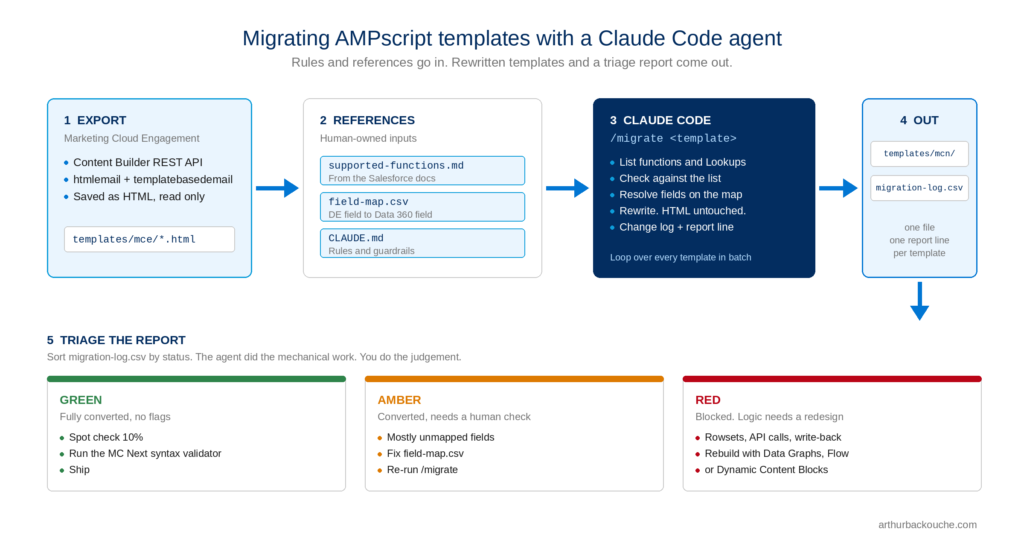
Six steps. The first two are human. The middle two are where the agent earns its keep. The last two are human again.
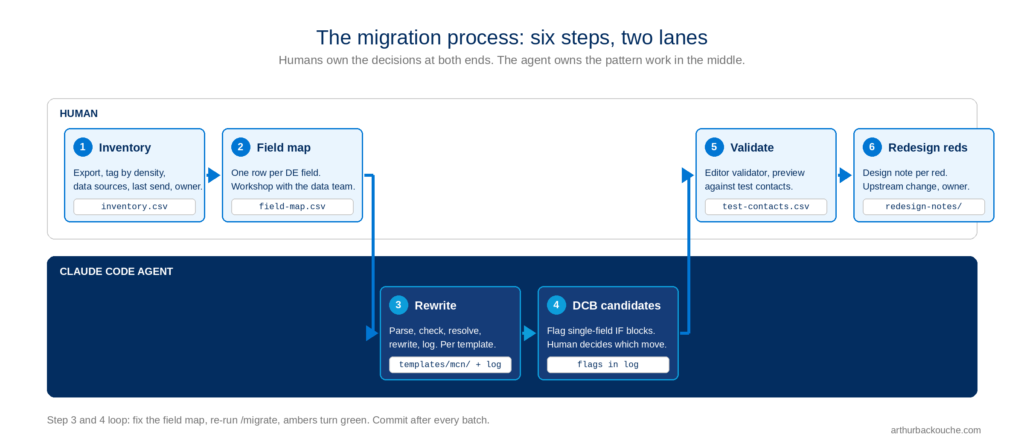
Step 1: Inventory (human, with agent help) #
Export every email asset. Tag each one on four dimensions:
- AMPscript density. None, merge fields only, simple (
IFand supported functions), medium (Lookup), complex (rowsets, API, SSJS, CloudPages). - Data sources touched. Which Data Extensions.
- Still in use. Last send date. Anything not sent in 12 months goes to an archive list and does not get migrated.
- Owner. Who signs off.
Expect the distribution to be top heavy. In most orgs I see, 60 to 70% of templates are merge fields plus a couple of IF blocks. Those are the quick wins.
Step 2: Build the field map (human) #
One row per Data Extension field referenced in any template in scope. Columns:
de_name, de_field, mcn_source, mcn_object, mcn_field, in_data_graph, notes
mcn_source is one of datagraph, marketing_object, crm, calculated_insight, drop. The drop value is for fields nobody can justify. There will be some.
This is a workshop with the data team, not a solo task. It is also the step that gets skipped, and the reason migrations stall. Do it properly.
Step 3: Rewrite (agent) #
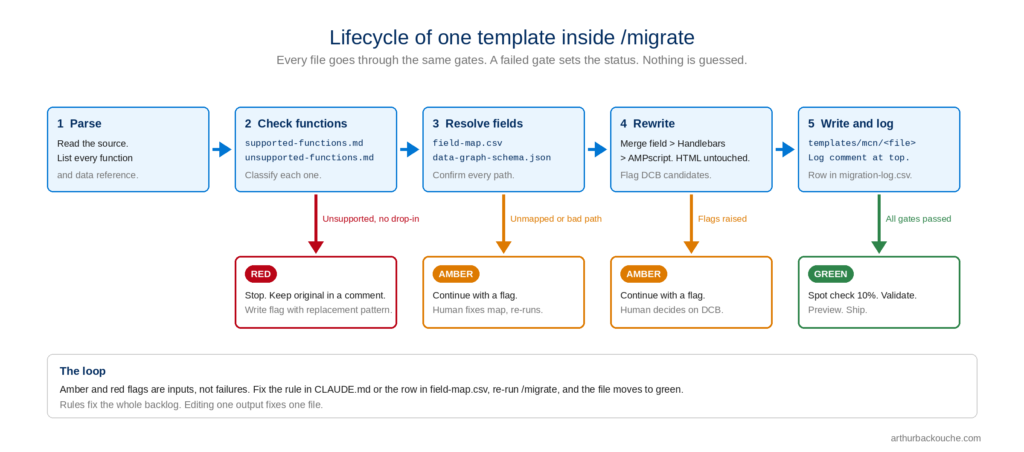
Every template goes through the same loop: parse, check functions, resolve fields, rewrite, log. Section 7 covers this in full.
Step 4: Move conditions into Dynamic Content Blocks (agent suggests, human decides) #
The agent flags every IF block that tests a single field against a fixed value. Those are candidates. A human decides which ones move to a Dynamic Content Block and which stay as code.
Step 5: Validate (human) #
Paste each output into the Marketing Cloud Next editor. The syntax validator catches errors and highlights them. Preview against three or four real test contacts, chosen to hit every branch. Section 9 covers this.
Step 6: Redesign the reds (human) #
Anything the agent marked red gets a short design note: what the old logic did, what the new approach is, what upstream change is needed. Section 8 covers the common patterns.
7. Building the Claude Code agent #
7.1 Why an agent, and why Claude Code #
The rewrite step is pattern work. Read a file, check a list, look up a map, swap syntax, write it down. Doing that 300 times by hand is slow and error prone. Doing it with a regex script is brittle, because AMPscript is not regular and the rewrites need context.
Claude Code sits in between. It is a command line agent that reads and writes files in a project folder, follows written rules, and can be given custom commands. It understands both AMPscript and Handlebars. It will not invent a function if you tell it not to. And it explains what it did.
The agent does not need access to Marketing Cloud. It works on exported files. That keeps the blast radius small.
7.2 Prerequisites #
- Claude Code installed and authenticated.
- A Marketing Cloud Engagement API integration (Installed Package) with read access to Content Builder assets.
- The field map from Step 2.
- Git.
7.3 Repository layout #
mce-migration/
  CLAUDE.md                        <- rules, read every session
  .claude/
    commands/
      audit.md                     <- /audit: inventory one template
      migrate.md                   <- /migrate: convert one template
      batch.md                     <- /batch: loop over the backlog
  reference/
    supported-functions.md         <- the 41, with Handlebars equivalents
    unsupported-functions.md       <- the 109, with the replacement pattern
    field-map.csv                  <- from Step 2
    handlebars-cheatsheet.md       <- helpers you actually use, with examples
    data-graph-schema.json         <- exported from Data 360, so paths can be checked
  templates/
    mce/                           <- exported originals, read only
    mcn/                           <- agent output
  reports/
    inventory.csv                  <- output of /audit
    migration-log.csv              <- output of /migrate
  scripts/
    export_assets.py               <- pulls templates out of Content Builder
7.4 Export the templates #
Content Builder exposes assets through the REST API. Authenticate with client credentials, then page through POST /asset/v1/content/assets/query filtered on the email asset types. Save each asset’s HTML view as a file. Keep the asset ID and customer key in a sidecar JSON so you can match output back later.
import requests, json, pathlib

BASE = "https://YOUR_SUBDOMAIN.rest.marketingcloudapis.com"
AUTH = "https://YOUR_SUBDOMAIN.auth.marketingcloudapis.com/v2/token"

token = requests.post(AUTH, json={
    "grant_type": "client_credentials",
    "client_id": "...", "client_secret": "...", "account_id": "..."
}).json()["access_token"]
h = {"Authorization": f"Bearer {token}"}

out = pathlib.Path("templates/mce"); out.mkdir(parents=True, exist_ok=True)
page = 1
while True:
    body = {
        "page": {"page": page, "pageSize": 50},
        "query": {"property": "assetType.name", "simpleOperator": "in",
                  "value": ["htmlemail", "templatebasedemail"]},
        "fields": ["id", "name", "customerKey", "views", "modifiedDate"]
    }
    r = requests.post(f"{BASE}/asset/v1/content/assets/query", headers=h, json=body).json()
    for a in r.get("items", []):
        html = a.get("views", {}).get("html", {}).get("content", "")
        slug = f"{a['id']}_{a['name']}".replace("/", "-").replace(" ", "_")
        (out / f"{slug}.html").write_text(html, encoding="utf-8")
        (out / f"{slug}.json").write_text(json.dumps(
            {k: a[k] for k in ("id", "name", "customerKey", "modifiedDate")}, indent=2))
    if page * 50 >= r.get("count", 0):
        break
    page += 1
Template-based emails store their content in slots and blocks rather than a single HTML view. For those, walk views.html.slots[*].blocks[*].content and concatenate, or export the referenced content blocks separately. The agent handles both. It just needs the AMPscript to be in the file.
7.5 Build the reference files #
The agent is only as good as what it can look up. It must never rely on its own memory for what is supported.
supported-functions.md. One line per supported function. Include the Handlebars equivalent where one exists, and a note where the behaviour differs.
| AMPscript | Supported in Next | Handlebars equivalent | Notes |
|---|---|---|---|
| Lookup() | Yes | none | Marketing Objects only. Not Data Extensions. |
| Empty() | Yes | {{#if}} / {{#unless}} | |
| FormatDate() | Yes | {{formatDate}} | System timezone is UTC. |
| FormatCurrency() | Yes | {{formatCurrency}} | |
| Iif() | Yes | {{#if}} inline | |
| Concat() | Yes | inline text | |
...
unsupported-functions.md. One line per cut function with the replacement pattern from section 3.3. The agent uses this to write a useful flag (“LookupOrderedRows is not supported. Pattern: Data Graph related list with #each. Needs human confirmation of the path.”) rather than a bare error.
field-map.csv. From Step 2. Example rows:
de_name,de_field,mcn_source,mcn_object,mcn_field,in_data_graph,notes
Customer_Master,FirstName,datagraph,Individual,FirstName,yes,
Customer_Master,Email,datagraph,ContactPointEmail,EmailAddress,yes,
Loyalty_Members,Tier,datagraph,LoyaltyProgramMember,MemberTier,yes,
Loyalty_Members,PointsBalance,datagraph,LoyaltyProgramMember,PointsBalance,yes,
Store_Reference,StoreName,marketing_object,StoreReference,StoreName,no,Lookup on StoreCode
Order_Lines,ProductName,datagraph,SalesOrderProduct,ProductName,yes,related list on Individual
Legacy_Flags,IsBetaUser,drop,,,,nobody could explain this field
data-graph-schema.json. Export the Data Graph definition from Data 360. The agent uses it to confirm that a mapped path actually exists before writing it. This catches a whole class of typos.
handlebars-cheatsheet.md. Not the whole reference. Just the helpers you will use, each with a two-line example from your own org. The agent copies patterns. Give it good ones.
7.6 Write the CLAUDE.md #
Read at the start of every session. Short, strict, no ambiguity.
# Email template migration: Marketing Cloud Engagement to Marketing Cloud Next

## Context
You are rewriting AMPscript email templates so they render in Marketing Cloud Next.
Source files: templates/mce/ (read only). Output: templates/mcn/.
Reference material lives in reference/. Reports go in reports/.

## Hard rules
1. Never modify HTML structure, CSS, images, links or copy. Only personalisation code.
2. Only use AMPscript functions listed in reference/supported-functions.md.
   If a function is not listed, do not use it and do not guess an alternative. Flag it.
3. Only use Handlebars helpers listed in reference/handlebars-cheatsheet.md.
4. Resolve every Data Extension field through reference/field-map.csv.
   If a field is not in the map, flag it. Never invent an object or field name.
5. Before writing a Data Graph path, confirm it exists in reference/data-graph-schema.json.
6. Never write to templates/mce/.

## Preferences
- Prefer merge fields for plain values.
- Prefer Handlebars for conditions, loops and formatting.
- Keep AMPscript only where the source used a supported function and the logic is
  clearer that way, or where Lookup() on a Marketing Object is required.
- Flag any IF block that tests a single field against a fixed value as a
  Dynamic Content Block candidate. Do not convert it to a block. Just flag it.

## Output format
Every file in templates/mcn/ starts with an HTML comment:
<!--
  MIGRATION LOG
  source: <file>
  status: green | amber | red
  changed: <bulleted list>
  flags: <bulleted list, or "none">
  dcb-candidates: <bulleted list, or "none">
  confidence: high | medium | low
-->

## Reporting
Append one row per template to reports/migration-log.csv with columns:
file, status, functions_used, unsupported_functions, unmapped_fields, dcb_candidates, confidence

## Status definitions
- green: every function supported, every field mapped, no flags.
- amber: converted, but one or more flags need a human check.
- red: contains an unsupported function with no drop-in replacement.
  Write the flag, do not attempt a redesign. Leave the original logic in a comment.
7.7 The commands #
Custom slash commands live in .claude/commands/. Each file is a prompt. $ARGUMENTS is whatever the user types after the command.
/audit does the inventory pass. It does not change anything.
# .claude/commands/audit.md
Audit templates/mce/$ARGUMENTS without modifying it.

Report:
1. Every AMPscript function used, with a count.
2. Every Data Extension and field referenced by Lookup(), LookupRows(),
   LookupOrderedRows() or merge field syntax.
3. Whether the file contains SSJS (<script runat="server">). If so, stop and say so.
4. A complexity rating: none / simple / medium / complex, using the definitions in CLAUDE.md.
5. A predicted status: green / amber / red, with one line of reasoning.

Append one row to reports/inventory.csv:
file, complexity, predicted_status, functions, data_extensions, has_ssjs
/migrate does the rewrite.
# .claude/commands/migrate.md
Migrate templates/mce/$ARGUMENTS to Marketing Cloud Next.

Work through these steps in order and show your reasoning for each:
1. Read the source. List every AMPscript function and every data reference.
2. Check each function against reference/supported-functions.md and
   reference/unsupported-functions.md. Classify each as supported / unsupported.
3. Resolve every data reference against reference/field-map.csv.
   For datagraph sources, confirm the path in reference/data-graph-schema.json.
4. If any function is unsupported with no drop-in replacement, set status to red.
   Write the migration log, leave the original block in an HTML comment, and stop.
5. Otherwise rewrite the personalisation using the preferences in CLAUDE.md.
   Do not touch anything that is not personalisation code.
6. Write the output to templates/mcn/ with the same file name.
7. Write the migration log comment at the top of the file.
8. Append the row to reports/migration-log.csv.
9. Show me a five-line summary: status, what changed, what needs my review.
/batch loops.
# .claude/commands/batch.md
For every file in templates/mce/*.html that has no matching file in templates/mcn/:
- Run the /migrate procedure.
- After each file, print one line: file name and status.
- Do not stop for amber. Continue.
- Stop and ask me if you hit three reds in a row. That usually means the field map
  is missing something.
- When done, print a count by status.
7.8 Running it #
Start with one template you know well:
/audit welcome-01.html
/migrate welcome-01.html
Read the output. Read the log comment. Open the diff. If the agent did something you would not have done, fix the rule in CLAUDE.md, not the output. Rules fix the whole backlog. Output fixes fix one file.
Do this for five or six templates across the complexity range. When the outputs match what you would have written, run the batch:
/batch
Commit after every batch. If a rule change turns out to be wrong, you can roll back cleanly.
7.9 Reading the report #
reports/migration-log.csv is the control panel. Sort by status.
Green. Spot check 10%. Paste into the editor. Run the validator. Preview. Ship.
Amber. Read each flag. Most are one of three things:
- An unmapped field. Add the row to
field-map.csv, re-run/migrateon that file. - A Data Graph path that does not exist. Either the Data Graph needs the object added, or the map is wrong.
- A Dynamic Content Block candidate. Decide, then either accept the code version or rebuild the variant in the editor.
Red. Section 8.
7.10 Guardrails #
- Originals are read only. Enforce it at the filesystem level (
chmod -R a-w templates/mce), not just in the prompt. - No function is used unless it is on the list. The list is built from the Salesforce docs, rebuilt every release.
- No field is used unless it is on the map. The map is signed off by the data owner.
- Every output carries a log. You can always see what was done and why.
- Git commit after every batch.
- The agent never touches Marketing Cloud. Uploading the outputs is a separate, human step.
7.11 What it costs #
A template of a few hundred lines with a handful of AMPscript blocks is a small job. Expect the batch to run at a few templates per minute. A backlog of 300 is an afternoon of agent time. The human time is in the field map, the amber review and the reds. That is where it should be.
8. Handling the reds #
Reds cluster into a small number of patterns. Each has a standard redesign.
Rowset loops (LookupRows, LookupOrderedRows). The most common red. Redesign: put the child object in the Data Graph as a related list, then {{#each}}. If you need sort or limit, and the Data Graph does not give you that control, handle it at ingestion or with a Calculated Insight that pre-selects the rows.
Write-back (InsertDE, UpdateDE, UpsertDE, UpsertContact, UpdateSingleSalesforceObject). Usually logging sends, updating a “last offer shown” field, or opting people into something. Redesign: a Flow, triggered by the send or by an engagement event. The email stays read only.
API calls (HttpGet, HttpPost). Usually fetching a price, a stock level, weather, or a personalised image URL. Redesign: pre-compute upstream. Ingest the value into Data 360 on a schedule and put it on the DMO. Send time reads it like any other field.
Encryption (MD5, SHA256, GetJwt). Usually hashed email addresses for tracking, or tokens for authenticated links. Redesign: generate the hash or token upstream and store it as a field.
CloudPages (CloudPagesURL, RequestParameter). Preference centres, surveys, landing pages. Redesign: out of scope for the email. Rebuild the page on Experience Cloud or the form tooling in Marketing Cloud Next, then link to it.
SSJS. Not AMPscript, but it shows up in the same templates. There is no SSJS in Marketing Cloud Next. Anything it did is a redesign using the patterns above.
For each red, write a short design note in reports/redesign-notes/<template>.md: what the old logic did, what the new pattern is, what upstream change is needed, who owns it. This becomes the backlog for the data team.
9. Testing #
The syntax validator in the Marketing Cloud Next editor catches errors and highlights them inline. It does not catch wrong data. You still need to render.
Pick test contacts deliberately. For every template, list the branches. Pick a contact that hits each one. Empty first name. Gold tier. No orders. Five orders. Each locale.
Preview each one. Check the value, the fallback, the formatting, the currency and the date. UTC bites people. If you display dates, confirm the timezone offset is applied.
Compare against the old render. Send the same test contact through the old template in Marketing Cloud Engagement. Put the two side by side. They should match, apart from the deliberate changes.
Keep the test contacts. Store them as a list in reports/test-contacts.csv with the branch each one covers. Reuse them for every template. Regression testing after a Data Graph change becomes a fifteen minute job.
Wrap-up #
Copy/paste fails because the data layer and the function set both changed. Treat the migration as a rewrite with a map, not a transfer.
Build the field map first. Then let an agent do the repetitive part: reading, checking, swapping, logging. Keep your own time for the field map, the amber decisions and the reds. That is where judgement is needed. Everything else is pattern work, and pattern work is what agents are for.
If you are planning a Marketing Cloud Next migration and want a second pair of eyes on your approach, reach out.