In this article I will explain how to use the Claude Skill I created to migrate Marketing Cloud Engagement email templates that contain AMPscript to Marketing Cloud Next. I will also show how I built the Skill, so you can adapt it or build your own.
The first step is to install the Marketing Cloud Engagement MCP Server and connect it to your Claude account. Once connected, you start a Claude session and ask it to run the Skill. Claude then does the following on its own:
- Analyses the code of every Marketing Cloud Engagement email and template.
- Uses the official Salesforce documentation as its reference for which AMPscript functions Marketing Cloud Next currently supports.
- Determines whether each email can be migrated to the new platform as written.
- If not, proposes a rework that re-engineers the email using a combination of Marketing Cloud Next personalisation features: supported AMPscript, Merge Fields and Dynamic Content.
Download:
ampscript-mcnext-audit.skill
Setting up the Marketing Cloud Engagement MCP Server #
With the Marketing Cloud Engagement MCP Server you can point Claude straight at your account and ask it to do real work in plain English. Create a Data Extension, inspect a journey, review an email, validate some SQL. No clicking through five screens to get there.
I set this up on a live account this week. It took about ten minutes once I understood the one thing that trips everyone up. Here is the whole process.
The one thing to get right #
Two URLs are involved, and they look almost identical. Mix them up and you get a cryptic HTTP 500 with no clue why.
- The MCP Server URL goes in Claude. It ends in
/api/mcp. - The Redirect URI goes in the Installed Package. It ends in
/api/mcp/oauth/callback.
Same URL. The Redirect URI is just the server URL with /oauth/callback on the end. Keep that straight and the rest is easy.
Part A: Configure Marketing Cloud Engagement #
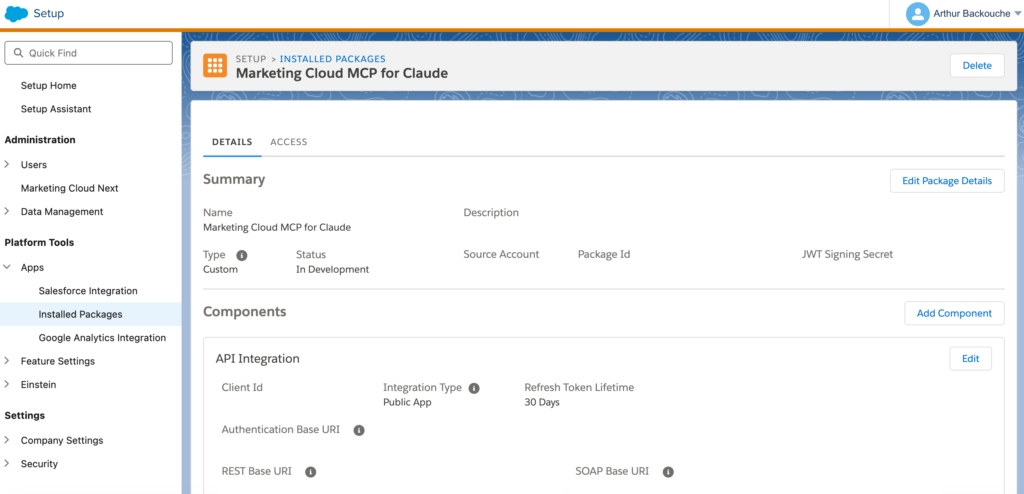
- Create an Installed Package. Setup > Platform Tools > Apps > Installed Packages > New. Name it something you will recognise.
- Add an API Integration component. Choose Add Component, pick API Integration, and select Public App.
- Enter a placeholder Redirect URI. You do not know the real one yet, so use
https://salesforce.comfor now. - Grant scopes. Add only what Claude needs. For this Skill, Content Builder Read is enough. Start minimal and expand later.
- Note your Tenant ID and Client ID. The Client ID shows on the package. The Tenant ID is the sub-domain inside your Authentication Base URI, the part before
.auth.marketingcloudapis.com. - Set the real Redirect URI. Go back into the API Integration, click Edit, and replace the placeholder with:
https://mai-mce-mcp-cdp1.sfdc-yfeipo.svc.sfdcfc.net/t/{TENANT_ID}/c/{CLIENT_ID}/api/mcp/oauth/callbackThat is the US host. For EU, swapsfdc-yfeipoforsfdc-yzvdd4. Save it.
Part B: Add the connector in Claude #
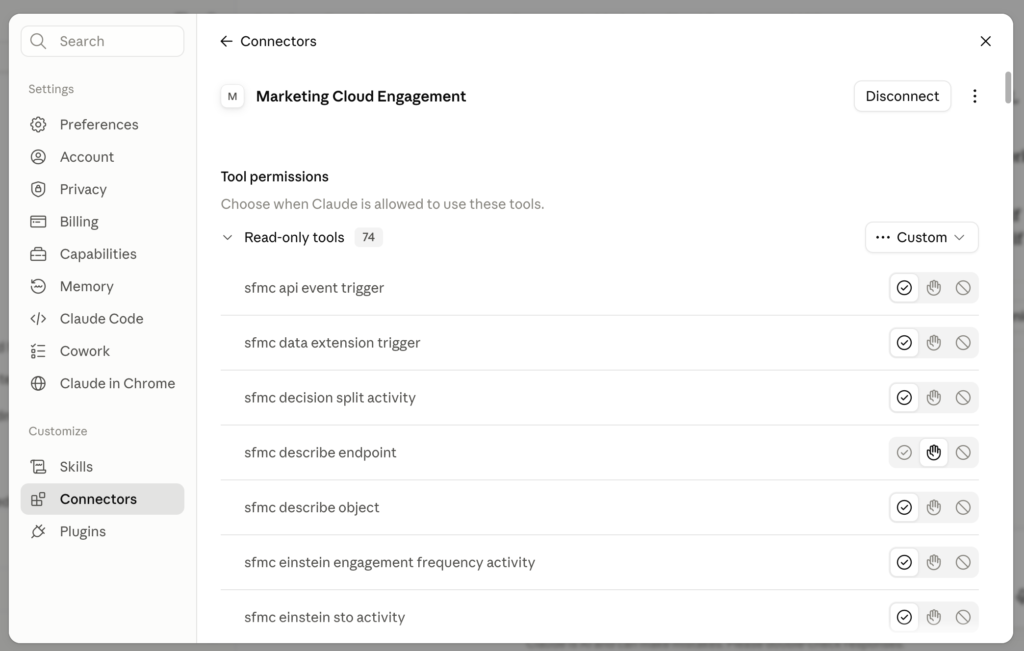
- Open the connector dialog. Settings > Connectors > Add custom connector.
- Name it. Anything you like.
- Enter the MCP Server URL. Same base as above, without the callback:
https://mai-mce-mcp-cdp1.sfdc-yfeipo.svc.sfdcfc.net/t/{TENANT_ID}/c/{CLIENT_ID}/api/mcp - Leave Advanced settings blank. Do not enter a Client ID or Secret. The server advertises its own OAuth details and Claude handles the handshake. Click Add, sign in to Marketing Cloud, and approve.
How the Claude Skill works #
Last month I ran an AMPscript compatibility audit for a client migrating from Marketing Cloud Engagement to Marketing Cloud Next. 494 emails, every function call scored against what Next supports today. The output was a client-ready PDF and a per-email register.
Then I asked Claude to turn the whole workflow into a Skill. Now anyone can run the same audit on their own MCE instance. Here is what is under the hood.
What a Skill is in Claude #
A Skill is a folder. It contains a SKILL.md file with instructions, plus optional scripts and reference files. When you ask Claude something that matches the Skill’s description, Claude reads the instructions and follows them. Think of it as packaged expertise: the workflow, the gotchas and the code, all versioned together.
Mine has four files. The instruction manual, a reference file with the MC Next function baseline, a parser script and a PDF builder.
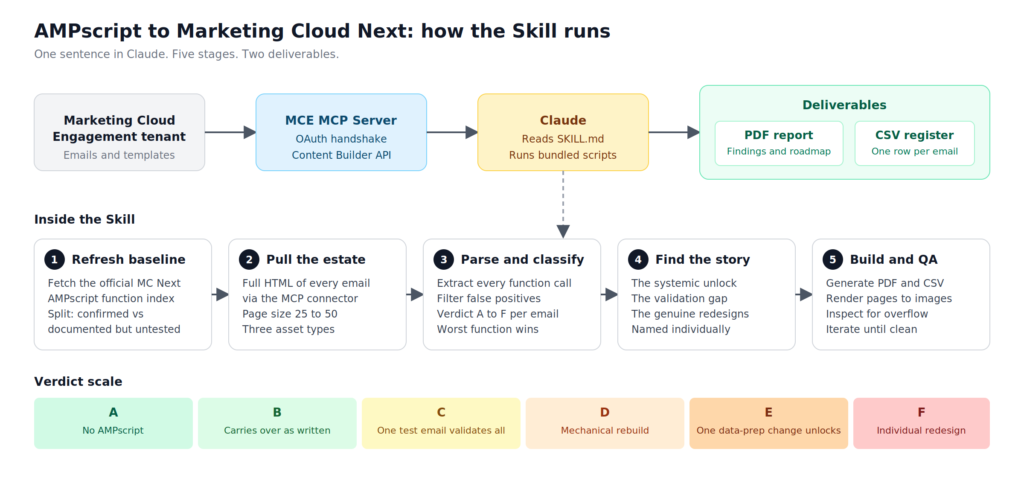
Stage 1: Refresh the baseline #
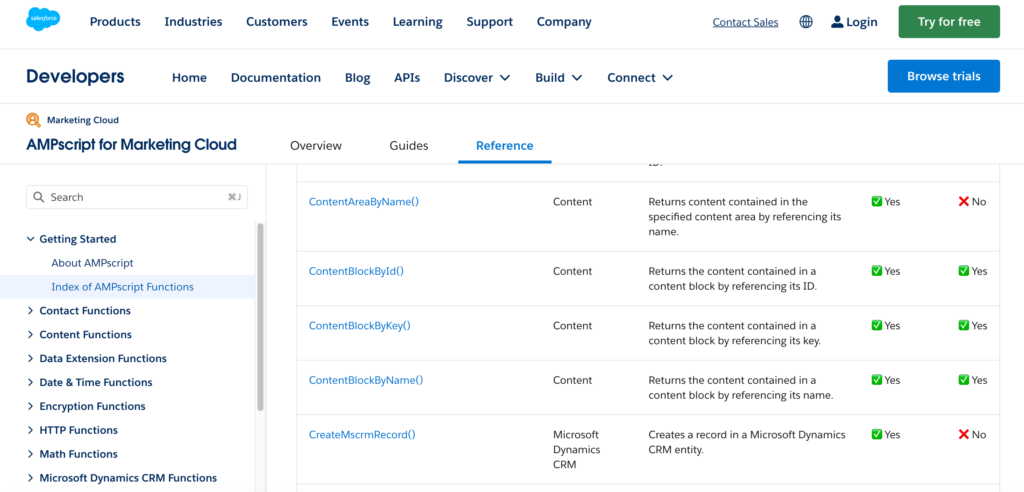
The Skill never trusts its own snapshot. Its first instruction is to fetch the official Salesforce AMPscript reference index for Marketing Cloud Next, because the supported list changes every release. It cross-checks against community runtime testing to split functions into two groups: confirmed working, and documented but not yet proven. That distinction matters later.
Stage 2: Pull the estate #
The Skill uses the Marketing Cloud Engagement MCP connector to pull the full HTML of every email and template through the Content Builder API. No exports, no copy-paste. It also encodes the operational lessons I learned the hard way: page sizes above 50 crash the connector, large responses land as files rather than in the conversation, and Loyalty Management generates dozens of near-identical email copies you can pattern-match instead of reading one by one.
Stage 3: Parse and classify #
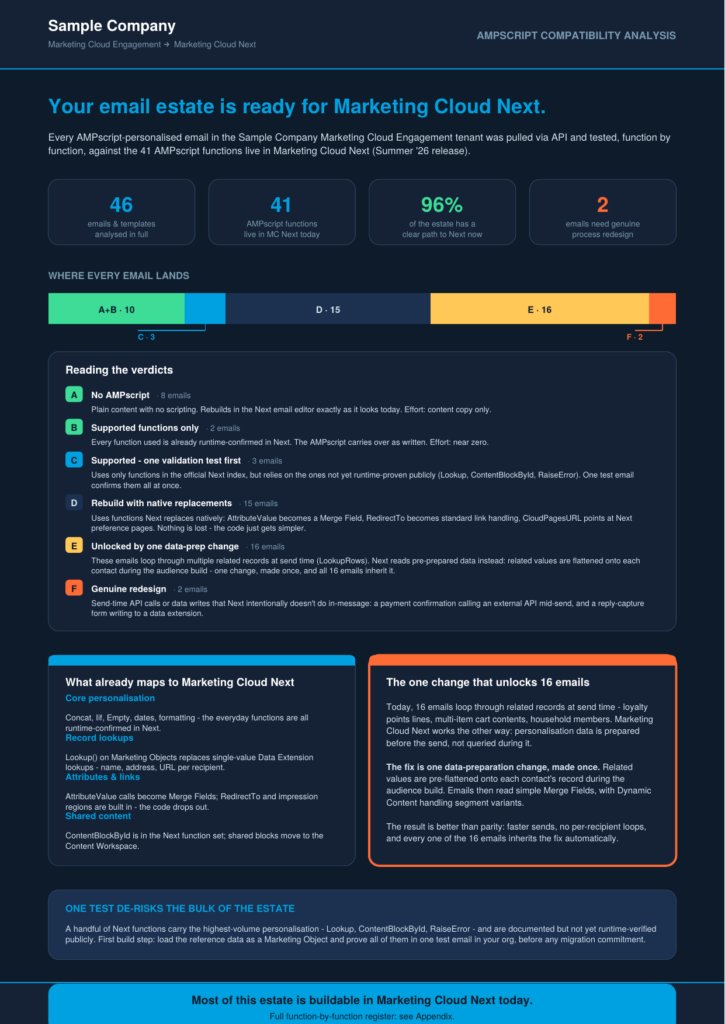
A Python script extracts every AMPscript block, collects every function call, and filters out false positives like content block names that look like functions. Each email then gets a verdict from A to F. A means no AMPscript at all. F means genuine redesign: send-time API calls or data writes that Next deliberately does not do. The worst function in the email wins.
| Verdict | Meaning | Effort |
|---|---|---|
| A | No AMPscript | Content copy only |
| B | Only runtime-confirmed functions | Carries over as written |
| C | Supported functions, but includes the untested ones | One test email validates all |
| D | Unsupported functions with a native Next replacement | Mechanical rebuild |
| E | Multi-row lookup family (LookupRows and friends) | One upstream data-prep change unlocks the category |
| F | Send-time writes or API calls | Individual redesign |
Stage 4: Find the story #
This is the part most automation misses. The Skill instructs Claude to interrogate the results for three things: the systemic fix that unlocks the biggest category at once, the high-volume functions that are documented but unverified, and the handful of genuine redesigns that deserve individual attention. In my client’s case, one data-prep change unlocked 335 emails. The numbers are different in every tenant. The questions are the same.
Stage 5: Build and QA the report #
The final script generates the PDF: an explainer page with the verdict breakdown and recommendations, plus a full appendix register. Every email gets a proposed rework recipe combining MC Next personalisation features: supported AMPscript, Merge Fields, Dynamic Content, and Flow for anything that needs to happen outside the send. Then Claude renders the PDF to images and visually inspects its own output for overflowing text and label collisions, iterating until the layout is clean.
How to build a Skill like this #
You do not need to write the Skill by hand. I did the audit once, manually, in a normal Claude session. At the end I asked Claude to package everything it had just done as a Skill. Here is what that produces and how to shape it.
1. Do the work once, manually #
Run the full workflow in a chat before you automate anything. Every wrong turn you hit becomes a rule in the Skill. Every script Claude writes along the way becomes a bundled file. A Skill written from theory is a template. A Skill written from a real run is a playbook.
2. Ask Claude to package it #
At the end of the session, a prompt like this is enough:
Turn everything you just did into a Claude Skill. Include the scripts you wrote, the function baseline as a reference file, and every operational lesson from this session as an explicit instruction. Package it as a zip I can upload.
Claude produces a folder with this structure:
ampscript-mcnext-audit/
├── SKILL.md                      # instructions and trigger description
├── references/
│   └── mcnext-functions.md       # supported-function baseline and verdict definitions
└── scripts/
    ├── parse_ampscript.py        # extract, filter, classify
    └── build_report.py           # generate the PDF and CSV
3. Get the description right #
The description in the frontmatter is what makes Claude pick up the Skill. It has to list the phrasings a real user would type. Mine includes “AMPscript compatibility”, “which emails will break in MC Next” and “migration readiness of our emails”. If the description is vague, the Skill never fires.
---
name: ampscript-mcnext-audit
description: >
  Audit a Marketing Cloud Engagement email estate for AMPscript compatibility
  with Marketing Cloud Next. Use when the user asks to check, audit or score
  their MCE emails against MC Next, including "AMPscript compatibility",
  "migration readiness" or "which emails will break in Next".
  Requires the Marketing Cloud Engagement MCP connector.
---
4. Encode the failure modes #
This is where the value sits. The SKILL.md for this audit contains rules like:
- Page through three asset types, not one:
templatebasedemail,htmlemailandtemplate. - Keep
$pagesizebetween 25 and 50. Larger pages crash the connector with a Java heap error. - Copy stored tool-result files into a working directory before parsing.
- If Data Extension calls are denied, keep going. The audit only needs Content Builder.
- Sanity-check the function census before building the PDF. If the top functions are not recognisable AMPscript, something is being misread.
None of that is in any documentation. All of it cost me time on the first run.
5. Make QA a step, not a hope #
The Skill ends with a mandatory visual QA loop. Claude renders the PDF to PNG, looks at page one and one appendix page, and fixes any overflow before delivering. Two or three iterations is normal. Writing “check the output” as a step means it happens every time.
6. Package and install #
Zip the folder so the skill folder sits inside the archive. In Claude, enable Code execution under Settings > Capabilities, then go to Skills and upload the zip. Open a new chat, make sure the MCE connector is on, and type one sentence: “Run the AMPscript audit for Marketing Cloud Next.” Claude asks for the client name to print on the report and takes it from there.
Why this matters #
The first audit took an hour of prompting and iteration. The Skill captures all of it. The next person types one sentence and gets the same rigour, including the mistakes already made and fixed. That is the real shift: consulting knowledge that used to live in someone’s head now ships as a file.