If you have been using Marketing Cloud Engagement for years, migrating to Marketing Cloud Next requires a certain amount of effort. Yes, feature parity between the two products is pretty much here. Yes, it makes sense to get started now. But there is a friction point: rebuilding all your marketing assets with a brand-new approach takes time. Salesforce understands that, and came out with a solution: Marketing Cloud Engagement+.
This article walks through what Engagement+ is, how the two platforms fit together, how to run your first 60 days, and where the real friction sits. It is based on the 60-Day Action Plan Salesforce shared with Engagement customers in March 2026, and on what I have seen running these set-ups.
Understanding Marketing Cloud Engagement+ #
Marketing Cloud Engagement+ is a product package that gives you access to Marketing Cloud Next while you keep using Marketing Cloud Engagement. In a nutshell, as a current Engagement customer, you get the new platform at the same time. Nothing is switched off. Nothing is migrated. You gain new capabilities on top of your existing investment.
There are a few benefits of accessing this new platform:
- Upskill your team on Marketing Cloud Next. Your team can explore and learn the new platform against real data, with real journeys running underneath. That is a very different learning curve from a demo org.
- Get started with the new Salesforce stack. Marketing Cloud Next relies on Data 360. Setting up the platform means setting up Data 360, identity resolution, data graphs and Flow. Those are the building blocks of everything Salesforce ships from now on.
- Get access to agentic features. From the Campaign Agent to the Journey Decisioning Agent, Marketing Cloud Next is where agentic AI lives. With Engagement+, you have access to it today.
One nuance worth stating early. Engagement+ does not require a full Data 360 implementation. The admin syncs the out-of-the-box Engagement data bundles, uses the default settings, and expands later. You can go live with a first use case without touching identity resolution if you do not need it.
The architecture: MC Next sits on top of Engagement #
Here is the interesting part of how Marketing Cloud Next integrates with the rest of the Salesforce stack. Marketing Cloud Next sits on top of Marketing Cloud Engagement, not beside it.
Think of it as four layers:
- Marketing Cloud Engagement at the bottom. Journeys, Content Builder, Data Extensions, AMPscript, Automation Studio. This is where sends execute today.
- Data 360 as the fabric. Engagement pushes its data (Journeys, Sends, Assets, Subscribers, and optionally your Data Extensions) into Data 360 through the out-of-the-box connector. Once the data lands here, the rest of Salesforce can use it.
- Marketing Cloud Next on Lightning. Campaigns, Flow, Segmentation, Marketing Performance, the Digital Wallet, unified reporting. It reads Data 360 and can trigger actions back into Engagement.
- Agentforce at the top. The Campaign Agent, the Segmentation Agent and the Journey Decisioning Agent all sit here, grounded in Data 360.
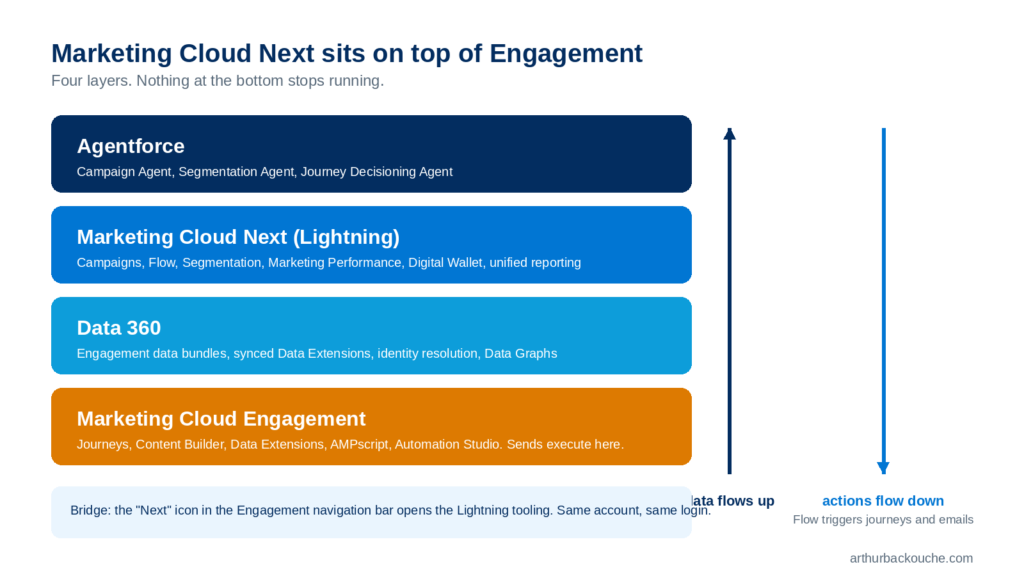
Inside Engagement, the bridge is a new “Next” icon in the top navigation bar. Click it and you land in Agentforce Builder, Analytics, Campaigns, Digital Wallet, Flow, Marketing Performance and Segmentation. Same account, same login, new tooling.
The beauty of having Marketing Cloud Next sitting on top of Engagement is that all your current marketing assets, journeys and automations keep running while you implement new use cases in Marketing Cloud Next. Flow can trigger an Engagement journey or an Engagement email. Flow can listen to Engagement events (Journey Entry, Exit, Goal Met). Content personalisation and send execution stay in Engagement. Orchestration and intelligence move up a layer.
Two technical details matter here:
- The initial Engagement to Data 360 connection backfills 90 days of send and engagement data. Anything older is not in the new reporting.
- Events flowing from Engagement to Flow have a latency of 15 minutes to 1 hour. Fine for nurture and re-engagement. Not fine for a real-time transactional trigger.
Two adoption paths #
There are two ways of approaching the move to Marketing Cloud Next.
Gradual adoption. Your organisation selects a specific use case and/or brand (if multi-brand) to get started and treats it as a pilot. Meanwhile your team continues working in Engagement and keeps building new assets there. You get incremental value on your existing account and adopt new capabilities at your own pace. This is the path Salesforce recommends in the 60-Day Action Plan.
Accelerated adoption. You stop building new marketing assets in Engagement and build every new campaign and operational process directly in Marketing Cloud Next. Existing journeys and automations keep running in Engagement until they are retired or rebuilt. You get the full benefit of the new platform without disrupting current operations, at the cost of a steeper learning curve for the team.
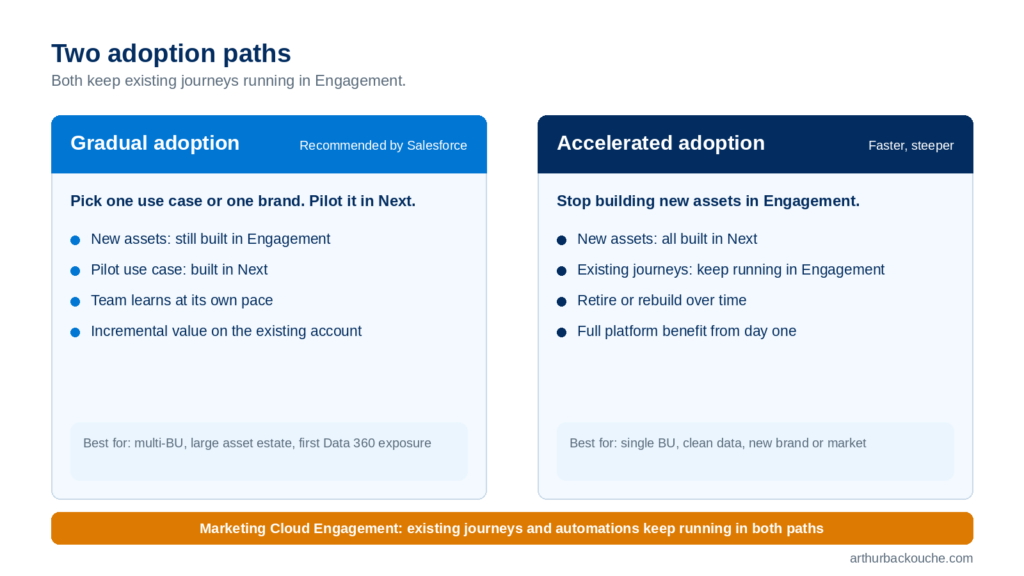
My recommendation: gradual for most teams, accelerated for two profiles. If you are a single-BU organisation with clean subscriber data and a small team, accelerated works because there is little to untangle. If you are about to launch a new brand or a new market with no existing journeys, build it in Next from day one. Everyone else should pick one use case, prove it in 60 days, then decide.
Before you start: business unit strategy #
This is the one decision in the whole set-up that you cannot easily undo, so it deserves its own section.
Marketing Cloud Next features run inside their own business unit concept, called a Data Space. To make Engagement data available to Next, you connect your existing Engagement business units (MCE BUs) to Data Spaces. The recommendation is simple:
- Map each MCE BU 1:1 to a Data Space. One Engagement BU, one Data Space. It is safe, it is easy to evolve, and it avoids data from two brands mixing in the same segment.
- Start with one or two BUs only. Pick the ones tied to your first use case.
- Install the Marketing app into a production-grade BU. Not a test BU. Use sandbox orgs for testing. You cannot uninstall the Marketing app from a Data Space once it is in.
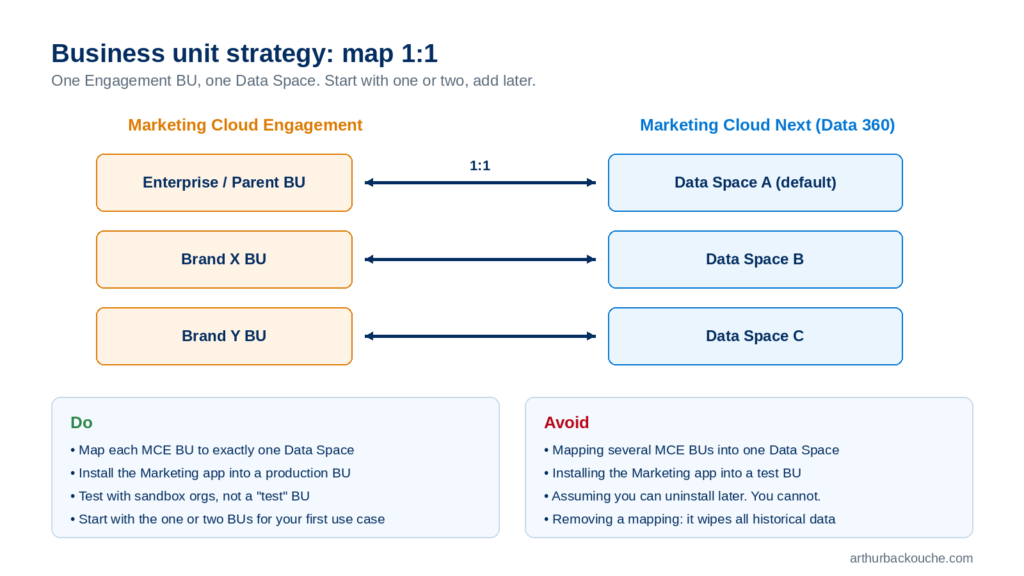
Why so much emphasis on this? Because the failure mode is painful. Multi-mapping is technically allowed. You can map one MCE BU to many Data Spaces, and many MCE BUs to one Data Space. But if you accidentally map several BUs into a single Data Space and later need to remove one, the removal also deletes all the historical data from that BU in the Data Space. Every report, segment and Flow depending on it breaks.
Adding mappings later is easy. Removing them is not. Start narrow.
One more thing to know: Next business units are not a copy of Engagement business units. Some functional differences exist (permissions, sender identities, consent). Read the documentation on Data Spaces before you design the mapping for a complex multi-brand org.
The first 60 days, in three phases #
The 60-Day Action Plan breaks the work into three blocks. Here is what actually happens in each.
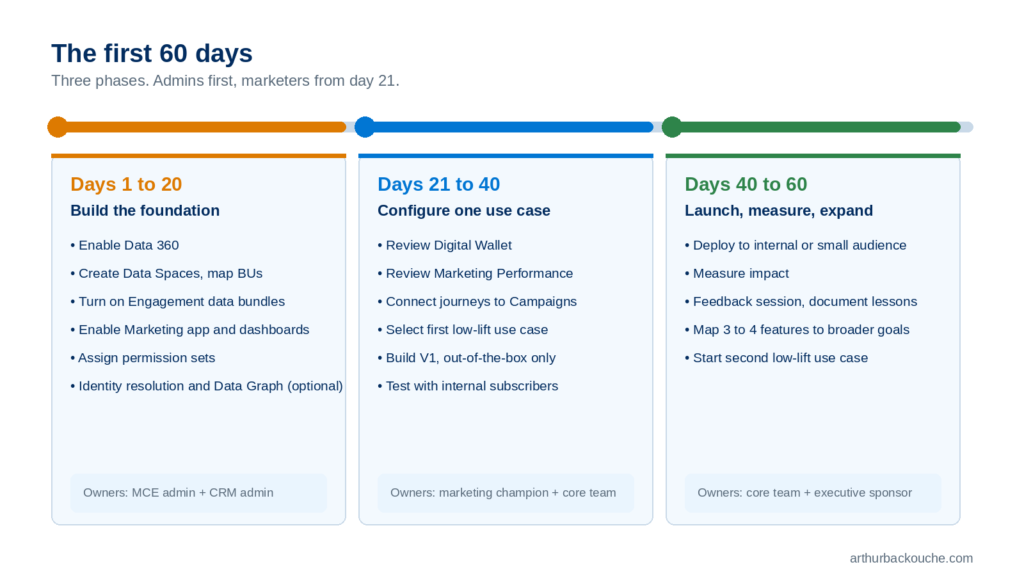
Days 1 to 20: build the foundation #
This is admin work, most of it in the Setup Assistant.
- Enable Data 360.
- Create a user for the Engagement admin in the core org.
- Create your Data Spaces (see previous section).
- Turn on the out-of-the-box Engagement data bundles and map your BUs.
- Enable the Marketing app and the out-of-the-box analytics dashboards.
- Add your marketing users to the core org and assign the standard Marketing Cloud permission sets.
- Configure and run identity resolution. Create a Data Graph.
- Optional: sync one or two key Data Extensions to Data 360 as custom DMOs, and create an Activation Template for Flow.
Steps 1 to 6 get you a working Next environment. Steps 7 and 8 unlock Flow decisioning, personalisation and the agents. If your first use case is reporting only, you can defer them.
Days 21 to 40: configure one use case #
Marketers enter the picture. Open the Digital Wallet and the Marketing Performance dashboards. Connect your existing journeys to Campaign records so they show up in the Campaign workspace. Then pick your first use case from the five low-lift options below, and build a V1 using only out-of-the-box features. No customisation yet.
Days 40 to 60: launch, measure, expand #
Deploy the use case to an internal or small external audience. Measure the impact. Run a feedback session with the core team and write down what you learned. Then start the second use case.
Who you need #
The plan names four internal roles:
- Executive sponsor. Secures time and budget for the 60 days.
- Marketing Cloud Engagement admin. Connects BUs, data bundles and users. Co-owns the Data 360 items.
- CRM admin. Handles Data 360 provisioning, identity resolution rules and platform permissions. Co-owns the Engagement admin items.
- Marketing champion. Defines the low-lift use case and validates the results.
On the Salesforce side you should expect your account executive (to validate SKU entitlements), your customer success manager, and, depending on your Success Plan, access to Cloud Experts for architecture reviews.
The CRM admin role is the one Engagement-only teams tend not to have. Line that person up before day one.
The five low-lift use cases #
Salesforce names five starting points. I have ranked them by effort, from lowest to highest.
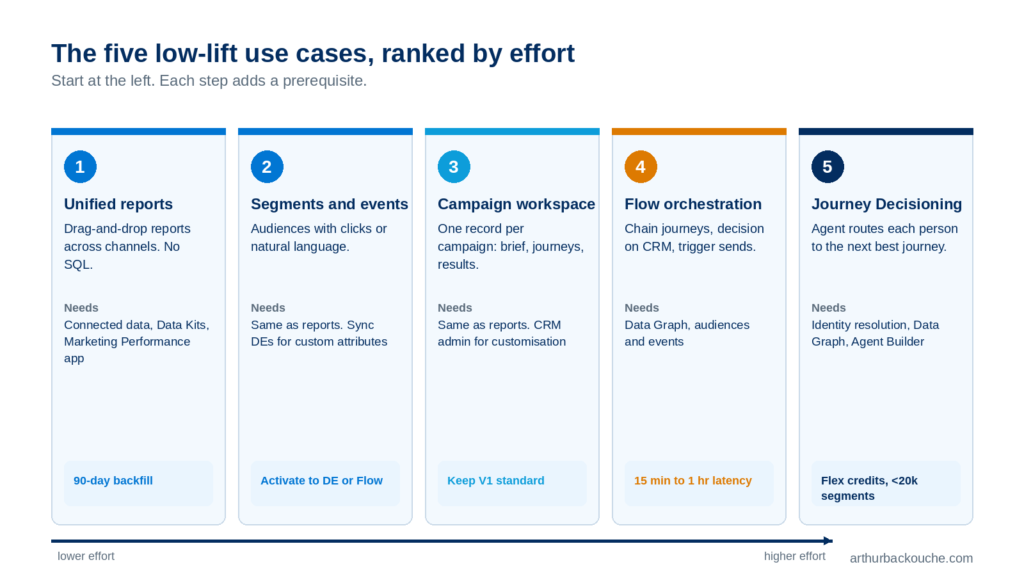
1. Unified and customised reports #
Engagement native reporting has always felt disjointed. Data Views, SQL queries, exports to spreadsheets. Marketing Cloud Next gives you a single drag-and-drop report builder across email, SMS, push, WhatsApp and journeys, plus Sales and Service Cloud data if you want it.
What you can do on day one: list every bounce reason for a subscriber in the last 30 days, chart top email error reasons, rank SMS sends by click-through, track keyword opt-ins over time. Level 2 is syncing a Data Extension or the SendLog to build reports on your own attributes (VIP members, product owners). Level 3 joins CRM objects so you can report click-through by lead status or account region.
Prerequisites: connected Engagement data, Data Kits, the Marketing Performance app. No identity resolution needed. Remember the 90-day backfill and make sure custom datasets carry a SubscriberKey.
2. Segments and event triggers #
Engagement relies on SQL for audiences. Next gives you Segment Builder with drag-and-drop filters (COUNT, SUM, AT LEAST, CONTAINS, LAST X DAYS) and the Segmentation Agent for natural language. “Everyone who clicked email X but not email Y.” “Opened the mobile app more than ten times in 30 days.” “Exclude anyone sent to more than ten times this week.”
Segments can be activated back to an Engagement Data Extension, or used directly in Flow. Flow can check segment membership inside a decision split.
Prerequisites: same as reporting. If you want to segment on Data Extension attributes, sync those DEs first. If you want unified segments across Engagement and CRM, you need identity resolution, and you need to check whether your SubscriberKeys match CRM Contact IDs.
3. Campaign workspace #
Engagement never had a home for a campaign. The brief lived in a document, the journeys in Journey Builder, the results in a dashboard. Next gives you the Campaign object as a single source of truth: brief, budget, owners, goals, linked journeys, performance, all in one record. Share the link with your sales team or your manager.
Level 2 is relating Files, Cases or Notes to campaigns and creating record types per campaign type or team. Level 3 is a full intake and approval workflow that templates campaigns and spins up Slack channels.
Prerequisites: same as reporting. Customisation to the Campaign object needs coordination with the CRM admin. Salesforce has also flagged that some advanced customisations (Slack integration, approvals) may be productised later, so keep V1 standard.
4. Flow orchestration #
This is the one that changes how you build. Flow sits above Journey Builder and orchestrates across journeys, CRM and external systems.
Level 1: a segment-triggered Flow that sends a follow-up Engagement email to everyone who opened a promotional send. Level 2: daisy-chain existing journeys (exit the Welcome journey, enter the Nurture journey) using Wait Until Event on Goal Met. Level 3: update a Contact in Sales Cloud, decision on a Case in Service Cloud, then trigger an Engagement message.
Salesforce recommends keeping the first Flow to audiences under one million per hour, and remembering the 15 minute to 1 hour event latency. Journey Builder is not going anywhere. Flow builds on top of it.
Prerequisites: connected data, a Data Graph to expose data to Flow, audiences and events created. Identity resolution is optional at Level 1 and 2.
5. Agentforce Journey Decisioning #
The most advanced starting point. An agent evaluates up to five Engagement journeys for each individual and routes them to the next best one, writing the recommendation to an output Data Extension in real time. Use cases: post-purchase, post-care in healthcare, travel re-engagement, post-donation for non-profits.
Salesforce is upfront that this is a Level 3 effort. It needs Unified Individuals (so identity resolution is mandatory), a Data Graph to ground the agent, and an agent built in Agent Builder. It consumes Flex credits, so it suits segments under 20,000, not batch-and-blast.
My advice: start with reporting or segmentation. Both are visible wins, both teach the team Data 360 concepts, and neither can break a live journey. Move to Flow once the team is comfortable. Save decisioning for when identity resolution is stable.
What comes after 60 days #
Once the first use case is live, the plan moves to advanced capabilities. This is where the platform starts to replace Engagement functions rather than layer on top of them.
Shared sending #
Shared sending lets you send from Marketing Cloud Next using the sender identities and consent you already manage in Engagement. Email domains, SMS codes, WhatsApp numbers and publication lists are shared to Next. Consent syncs bi-directionally: an unsubscribe in Next suppresses in Engagement, and the reverse.
Three things to plan for:
- Domains carry over, IPs do not. Next starts you on a managed shared IP pool and moves you to dedicated IPs based on volume.
- Reputation does not carry over either. Even with a well-established shared domain, plan a 4 to 8 week warm-up. Start with your most engaged subscribers and ramp gradually.
- Consent is anchored differently. Engagement checks consent at the subscriber level. Next checks it at the Contact Point (the email address or phone number) plus Communication Subscription level. If two subscriber records share one email address and that address opts out, both records are suppressed in Next. In Engagement, only the record that opted out is suppressed.
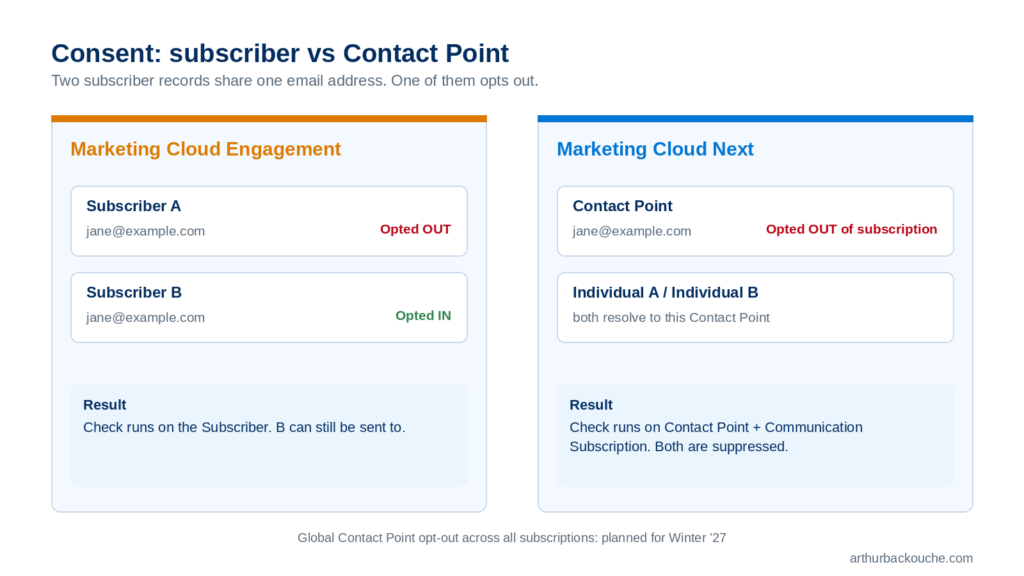
Mapping an Engagement publication list to Next creates a Communication Subscription automatically. For consent stored in Data Extensions, you sync the DE to Data 360 and update the Next consent model through Flow. A global opt-out at the Contact Point level is planned for Winter ’27.
Conversational messaging #
Turns outbound email, SMS and WhatsApp into two-way conversations handled by an Agentforce agent, with a handoff to a human rep in Service Cloud. Use cases: confirm or reschedule an appointment by replying to the reminder, recover an abandoned cart, triage a billing alert. Generally available across all three channels. Requires Digital Engagement or Agentforce Contact Center Digital, plus Agentforce and Data 360 enabled. Consumes both message credits and Flex credits.
AMPscript for Next #
Your existing AMPscript logic can move into Next sends. Math, date and formatting functions (DateDiff, FormatDate, ProperCase) reuse as-is. Lookups need to point at a Data Graph or a synced DMO instead of a Data Extension. Not every function is supported, so audit your scripts first and test in a sandbox. I covered the detail, and the agent I built to automate the rewrite, in my previous article.
Rich Communication Services #
Branded, verified, rich mobile messages with images, carousels and one-tap replies, delivered in the native messaging app. Regionally GA in the US, Mexico, Brazil, France, Germany, the UK and India as of Summer ’26. Not in Australia yet. Requires carrier registration of a branded RCS agent and explicit consent from subscribers.
The honest friction points #
The 60-Day Action Plan is a Salesforce document and reads that way. These are the points I would want to know before signing off on the project.
- The BU mapping is permanent. You cannot uninstall the Marketing app from a Data Space, and undoing a multi-mapping wipes historical data. Design it once, on paper, before you click.
- Deliverability restarts. Domains share, IPs and reputation do not. Any shared sending project needs a warm-up plan built into the timeline.
- Consent semantics change. The consent system can synchronise between the two platforms, but it requires specific set-up, and the Contact Point model behaves differently from the subscriber model. Households sharing an email address are the classic edge case. Test it.
- AMPscript needs an audit. As explained in my last article, you cannot simply copy and paste AMPscript email templates from Engagement to Next. You need to re-adapt the way the emails are built, in particular the data lookups.
- Agentic features consume Flex credits. Salesforce is gradually moving from a per-user licence to a consumption model. Most agentic features in Marketing Cloud Next rely on this new pricing. You need to adapt and monitor consumption through the Digital Wallet. The Wallet lets you forecast and set alerts, so use it from day one.
- Your CRM admin is now part of the marketing team. This is change management. Your Salesforce CRM administrator now needs to co-exist and collaborate with the marketing team, because both are working directly in the core platform and building or interacting with Flows. Permissions, identity resolution rules and Campaign object customisations all cross that line.
- The data window is 90 days. Historical reporting beyond that stays in Engagement until you sync it in yourself.
None of these are blockers. They are the reason the recommended path is gradual.
So, is it worth it now? #
Yes. Getting started today with Marketing Cloud Next is worth it. The approach is to add Marketing Cloud Next as an additional layer on your Salesforce stack rather than run an immediate direct migration.
Engagement+ makes that possible. Your journeys keep running. Your team learns Data 360 on real data. You get unified reporting, no-code segmentation and Flow orchestration within 60 days, and you build towards the agentic features at your own pace.
If I had to give a one-line verdict per profile:
- Single BU, clean data, small team. Go now. Consider the accelerated path.
- Multi-BU enterprise. Go now, gradual path. Spend the first week on the BU mapping design alone.
- Heavy AMPscript estate. Go now, but keep sends in Engagement. Start with reporting and segmentation while you audit the scripts.